Templates
This exercise introduces Jinja2 templating within Ansible, a powerful feature for generating dynamic files from templates. You’ll learn how to craft templates that incorporate host-specific data, enabling the creation of tailored configuration files for each managed host.
Introduction to Jinja2 Templating
Ansible leverages Jinja2, a widely-used templating language for Python, allowing dynamic content generation within files. This capability is particularly useful for configuring files that must differ from host to host.
Crafting Your First Template
Templates end with a .j2 extension and mix static content with dynamic placeholders enclosed in {{ }}.
In the following example, let’s create a template for the Message of the Day (MOTD) that includes dynamic host information.
Set Up the Template Directory
Ensure a templates directory exists within your lab_inventory directory to organize your templates.
mkdir -p ~/lab_inventory/templatesDevelop the MOTD Template
Create a file named motd.j2 in the templates directory and add the following content:
Welcome to {{ ansible_hostname }}.
OS: {{ ansible_distribution }} {{ ansible_distribution_version }}
Architecture: {{ ansible_architecture }}
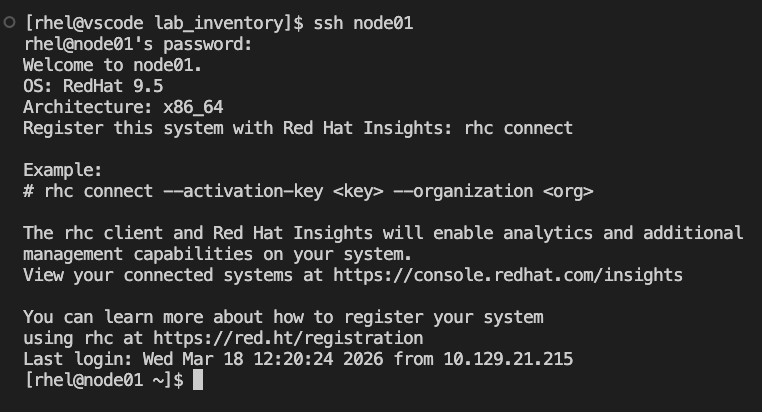
This template dynamically displays the hostname, OS distribution, version, and architecture of each managed host.
Deploying the Template with a Playbook
Utilize the ansible.builtin.template module in a playbook to distribute and render the template across your managed hosts.
Modify the system_setup.yml Playbook with the following content:
---
- name: Basic System Setup
  hosts: all
  become: true
  vars:
    user_name: 'Roger'
    package_name: httpd
  tasks:
    - name: Install required packages
      ansible.builtin.package:
        name:
          - git
          - vim
        state: present

    - name: Create a new user
      ansible.builtin.user:
        name: "{{ user_name }}"
        state: present
        create_home: true

    - name: Install Apache on web servers
      ansible.builtin.package:
        name: "{{ package_name }}"
        state: present
      when: inventory_hostname in groups['web']

    - name: Install firewalld
      ansible.builtin.package:
        name: firewalld
        state: present
      when: inventory_hostname in groups['web']

    - name: Ensure firewalld is running
      ansible.builtin.service:
        name: firewalld
        state: started
        enabled: true
      when: inventory_hostname in groups['web']

    - name: Allow HTTP traffic on web servers
      ansible.posix.firewalld:
        service: http
        permanent: true
        state: enabled
      when: inventory_hostname in groups['web']
      notify: Reload Firewall

    - name: Update MOTD from Jinja2 Template
      ansible.builtin.template:
        src: motd.j2
        dest: /etc/motd
        mode: '0644'

  handlers:
    - name: Reload Firewall
      ansible.builtin.service:
        name: firewalld
        state: reloaded
The ansible.builtin.template module takes the motd.j2 template and generates an /etc/motd file on each host, filling in the template’s placeholders with the actual host facts.
Executing the Playbook
Run the playbook to apply your custom MOTD across all managed hosts:
ansible-playbook -i hosts system_setup.yml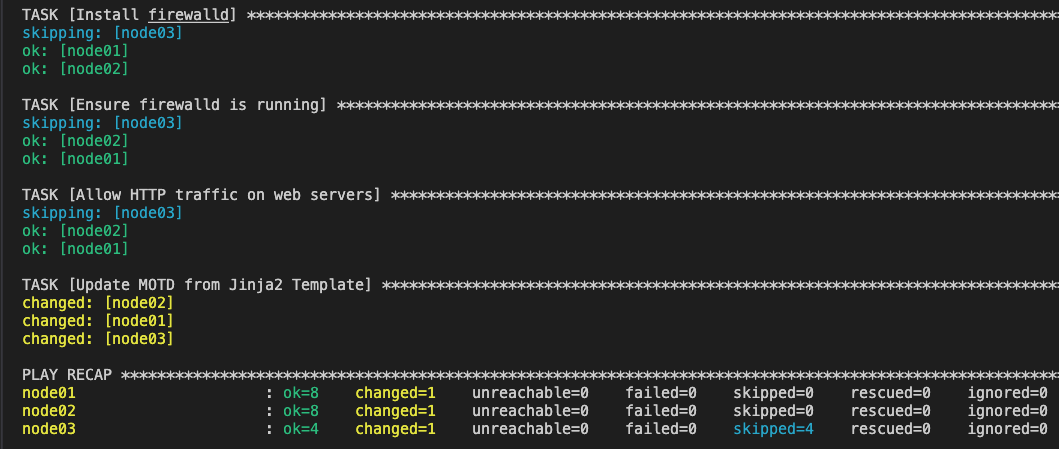
Verify the message of the day was deployed correctly by SSHing into node01 — the MOTD will display automatically on login:
ssh node01
When prompted for a password, enter ansible123!
|
Exit the SSH session to return to your control node before continuing to the next exercise:
exitSummary
You’ve successfully completed the Jinja2 templating exercise! You now have:
-
Learned how Jinja2 templating enables dynamic file generation in Ansible
-
Created a
.j2template file with dynamic placeholders for host-specific data -
Used the
ansible.builtin.templatemodule to deploy the template across managed hosts -
Verified the rendered MOTD output on remote nodes via SSH