Introduction to Ansible Automation Platform
Ansible Automation Platform (AAP) is a comprehensive automation solution that provides a scalable framework for automating tasks across IT environments. It integrates various components, including automation controller, Event-Driven Ansible and automation hub, offering users a unified platform for managing, executing, and orchestrating automation workflows. AAP simplifies the complexity of IT automation by providing the tools necessary to accelerate the automation process, whether you are just getting started or scaling automation across teams and environments.
Why Use Ansible Automation Platform?
-
Scalable Automation: Automate tasks of any complexity across on-premise, cloud, or hybrid environments. AAP enables teams to manage their automation consistently and efficiently at scale.
-
Unified Experience: AAP brings together automation controller, Event-Driven Ansible, and automation hub under one platform providing users with a cohesive, integrated experience for developing and managing automation.
-
Increased Productivity: With tools for automation content creation, testing, and deployment, AAP helps users across different skill levels work more efficiently. From automation architects to operators, it empowers users to implement automation faster and with fewer errors.
-
Enhanced Security and Governance: AAP supports role-based access control (RBAC), ensuring that only authorized users can create and execute automation. This security layer is crucial for maintaining compliance and governance across IT operations.
Logging into Automation Controller
To access the automation controller web UI, click the AAP tab at the top of the Showroom interface. Log in with the following credentials:
| Parameter | Value |
|---|---|
Username |
|
Password |
|
Ansible Automation Controller
The automation controller is a key component of Ansible Automation Platform. It offers a web-based interface that provides a centralized point to manage, monitor, and control automation.
Key Features of Automation Controller:
-
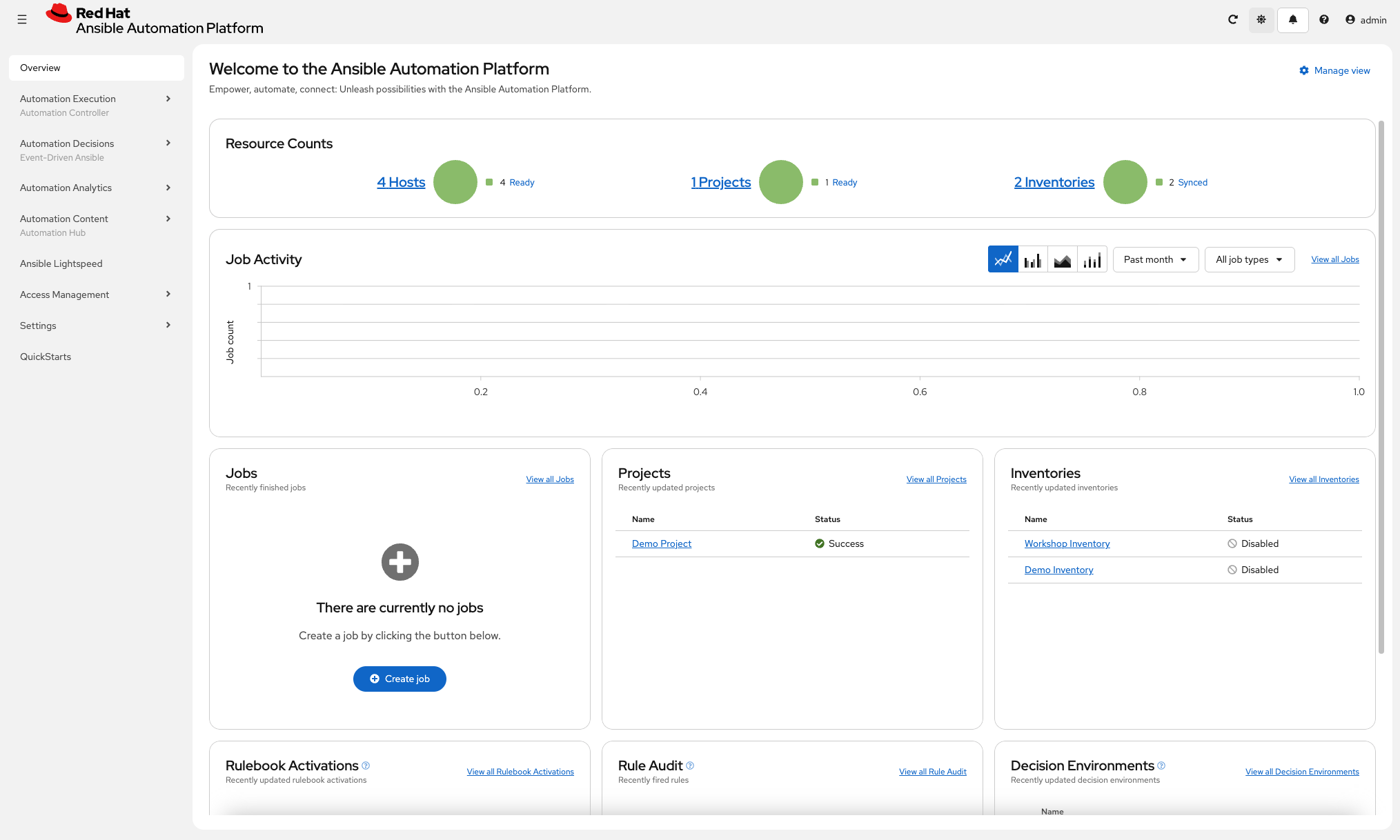
User-Friendly Dashboard: After logging in, the controller’s dashboard offers a real-time view of recent job activity, managed hosts and hands-on quick starts to get you started as quickly as possible with Ansible Automation Platform.
-
Visual Workflow Management: Easily create and modify automation workflows using the visualizer to visualize complex workflow streams.
-
RESTful API: The platform includes an extensive REST API, which makes integration with other tools and platforms seamless.
-
Inventory and Credential Management: Automation controller manages inventories and credentials securely, ensuring that only authorized users have access to sensitive data while simplifying configuration.
-
Curated Launch Experiences: With surveys and RBAC, job templates can be exposed to self-service views so approved users can launch automation consistently.
Core Concepts:
-
Projects: Logical collections of Ansible assets such as collections, roles and playbooks stored in a version control system.
-
Inventories: Collections of hosts against which automation tasks are run. Inventories can be manually defined or dynamically synchronized.
-
Credentials: Securely stored credentials for authentication when executing jobs against systems or integrating with third-party tools.
-
Job Templates: Defined sets of parameters that allow for the consistent execution of automation jobs from an Ansible playbook.
-
Execution Environments: Container images that standardize the runtime for jobs across development and controller.
Automation Hub
Automation Hub serves as the central repository for managing and distributing Ansible content. It provides access to certified, validated and community-contributed Ansible collections allowing organizations to leverage automation solutions and share automation content across teams.
Key Features of Automation Hub:
-
Content Management: automation hub allows users to access and manage certified, validated and community-contributed content collections, including playbooks, roles, and modules, in one central location.
-
Certified Content: Provides access to certified Ansible content supported by Red Hat, ensuring that organizations use secure, tested automation.
-
Validated Content: Provides a set of collections containing pre-built YAML content (such as playbooks or roles) to address the most common automation use cases.
-
Private Automation Hub: Organizations can create their own private automation hub to store and distribute custom automation content internally, offering control and security over automation assets.
-
Collection Repository Management: Allows fine-grained control over who can access specific content, ensuring that only the right teams have access to the right resources.
Core Concepts:
-
Collections: Bundles of Ansible content (playbooks, roles, modules) that can be shared and reused across automation projects.
-
Certified Content: Verified, secure content from Red Hat and partners, ensuring trust and reliability in automation implementations.
-
Private Automation Hub: A self-hosted version of automation hub, where organizations can curate, store, and manage their own collections of automation content.
Summary
In this exercise you:
-
Learned what Ansible Automation Platform (AAP) is and how it unifies automation tooling
-
Explored the benefits of AAP including scalability, security, and increased productivity
-
Reviewed automation controller features such as the dashboard, workflow visualizer, and REST API
-
Understood core controller concepts: projects, inventories, credentials, job templates, and execution environments
-
Explored Automation Hub for managing certified, validated, and community-contributed collections
For more information on Ansible Automation Platform and its latest features, explore the official Red Hat Ansible Automation Platform website.