Ansible Navigator and Execution Environments
In the previous exercise you built a custom webops.apache collection and ran it with ansible-playbook. In this exercise you will learn how Ansible Navigator and Execution Environments (EEs) change that workflow — packaging everything your automation needs into a portable container image and giving you a consistent runtime whether you are running locally or in Automation Controller.
What is ansible-navigator?
ansible-navigator is a text-based user interface (TUI) and command-line tool for developing and running Ansible automation. It extends the ansible-playbook workflow by:
-
Running playbooks inside a containerized Execution Environment
-
Providing an interactive TUI for exploring playbook output, module docs, and EE contents
-
Matching the runtime your Automation Controller uses, so what works locally works in production
What is an Execution Environment?
An Execution Environment is a container image that bundles together:
-
ansible-core -
Python runtimes and dependencies
-
Ansible collections and their prerequisites
Because everything is packaged in one image, every team member and every controller job uses the identical runtime — no more "works on my machine" issues.
Examining the Execution Environment
Change to your working directory:
cd ~/lab_inventoryRun ansible-navigator images to list the Execution Environments available on your control node:
ansible-navigator images|
The EE image will be pulled on first run. This will take a minute — once complete, the TUI will launch automatically. |
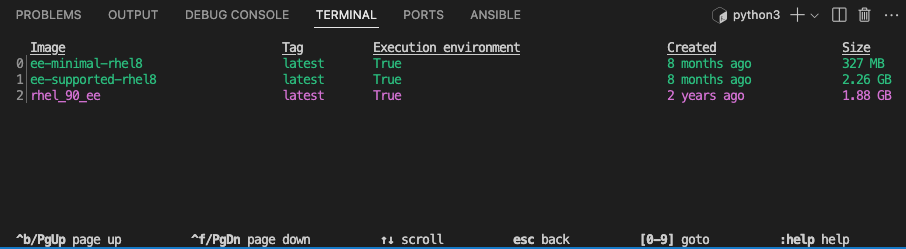
You will see the rhel_90_ee image listed. Press the number shown next to it to open the EE detail menu.
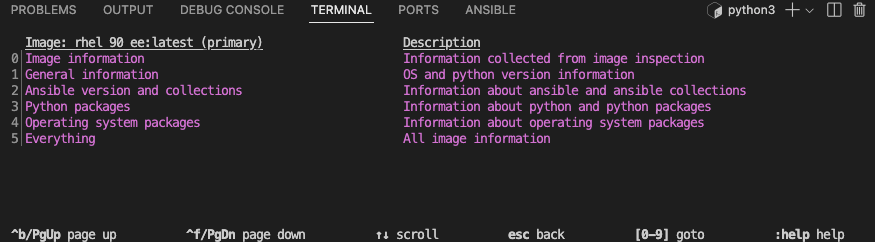
From the detail menu, select option 2 — Ansible version and collections — to inspect what is packaged inside the EE:
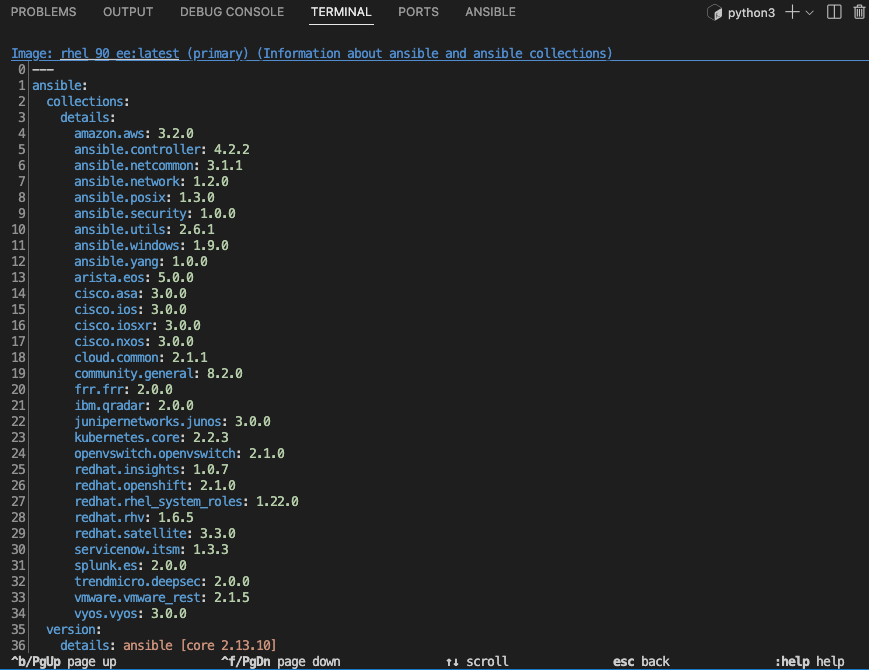
Here you can see the ansible-core version and every collection bundled into the image, including ansible.posix which your collection depends on.
Press Esc to exit the TUI when you are done exploring.
|
The output you see may differ slightly from the screenshots above — this reflects the specific EE image built for this lab. |
Examining the ansible-navigator Configuration
Your environment includes a pre-configured ~/.ansible-navigator.yml file. View it with:
cat ~/.ansible-navigator.yml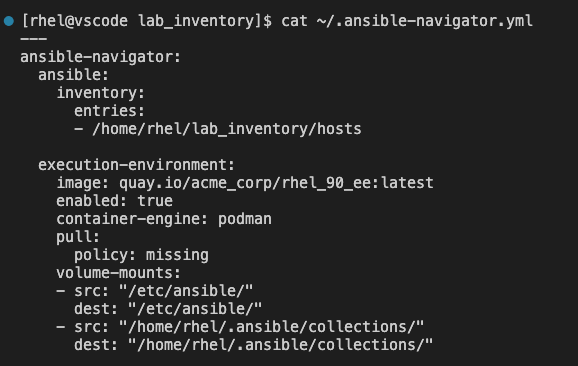
Key parameters to note:
-
inventory.entries— points navigator to your lab inventory file, so you do not need to pass-i hostson the command line -
execution-environment.image— the container image used for every playbook run -
execution-environment.container-engine— usespodmanto run the EE rootlessly -
execution-environment.pull.policy: missing— pulls the image only if it is not already present locally -
volume-mounts— mounts your local collection paths into the EE so thewebops.apachecollection you built in the previous exercise is available inside the container
Running the Collection Playbook with ansible-navigator
In the previous exercise you ran deploy_apache.yml directly with ansible-playbook. Now run the same playbook through ansible-navigator so it executes inside the EE:
ansible-navigator run deploy_apache.yml -m stdout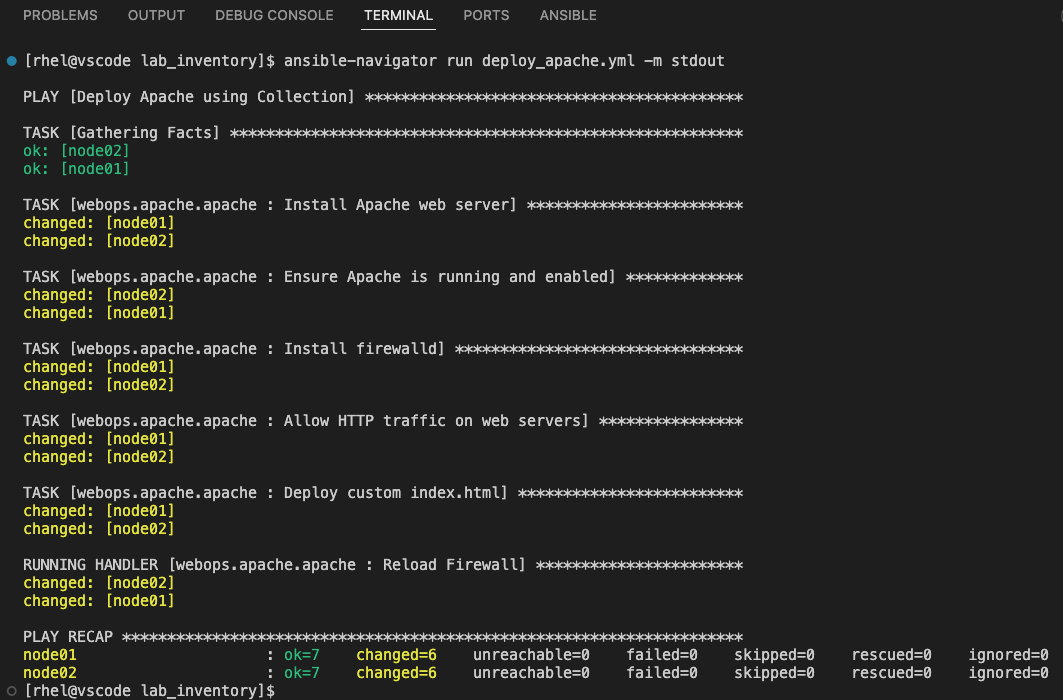
Notice that the playbook output looks identical to what ansible-playbook produces — the difference is that the tasks ran inside the containerized EE rather than directly on the control node.
Verify Apache is Running
After the playbook completes, verify Apache is active on the web servers:
ssh node01 "systemctl status httpd"
When prompted for a password, enter ansible123!
|
You should see output confirming Apache is running. Confirm the web page is being served:
curl http://node01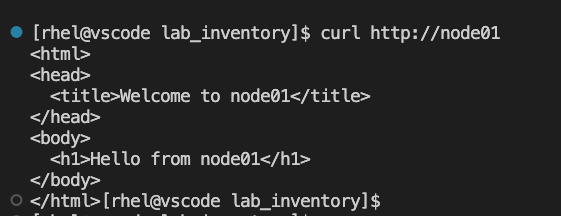
Exploring Module Documentation
One advantage of ansible-navigator is built-in access to module documentation pulled from inside the EE:
ansible-navigator doc ansible.builtin.template -m stdoutansible-navigator doc ansible.posix.firewalld -m stdoutThis ensures the docs you read match the exact collection versions packaged in your EE.
ansible-navigator vs ansible-playbook
Both tools run Ansible playbooks, but they serve different purposes:
| ansible-playbook | ansible-navigator |
|---|---|
Runs directly on the control node |
Runs inside a containerized EE |
Uses locally installed collections and Python |
Uses the versions packaged in the EE image |
Standard for ad-hoc and simple workflows |
Standard for team and controller-aligned workflows |
No built-in TUI or doc browser |
Includes TUI, doc browser, and EE inspection |
In Automation Controller, all jobs run with Execution Environments by default. Using ansible-navigator locally means your development environment matches production exactly.
Summary
In this exercise you:
-
Learned what Execution Environments are and why they provide a consistent automation runtime
-
Used
ansible-navigator imagesto inspect the EE and view its bundled collections andansible-coreversion -
Examined the
~/.ansible-navigator.ymlconfiguration file and understood its key parameters -
Ran the
deploy_apache.ymlcollection playbook inside an EE usingansible-navigator -
Verified that Apache was running and serving the custom web page
-
Explored module documentation directly from the EE using
ansible-navigator doc -
Compared the
ansible-playbookandansible-navigatorworkflows and when to use each