Models as a Service
Exercise 4: Models as a Service
The small CPU-hosted model you deployed helped you learn how model serving works. For Fed Aura Capital’s more demanding use cases, Lenora uses a larger model: qwen3-235b-a22b, hosted on GPU infrastructure by the platform team.
Rather than asking each application team to deploy and manage its own model, the bank provides shared models through Models-as-a-Service (MaaS). The platform team manages the deployments and controls access, while application teams consume the models through an API.
In this exercise, you’ll explore the qwen3-235b-a22b endpoint available to you and try it in the playground. In the next exercise, you’ll create an API key to use it from code or other tools.
Explore AI Asset Endpoints
-
Navigate to Gen AI Studio > AI Asset Endpoints. Observe that
qwen3-235b-a22bis listed as an endpoint.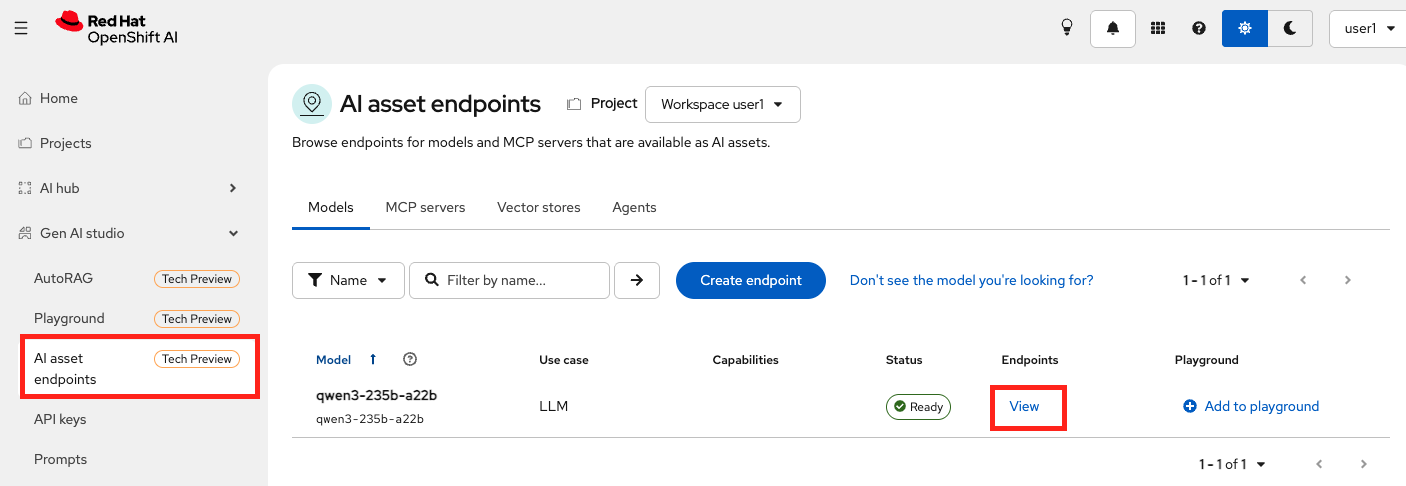
-
Click on View to view its details: the endpoint URL, the underlying model, and the subscription configured for it.
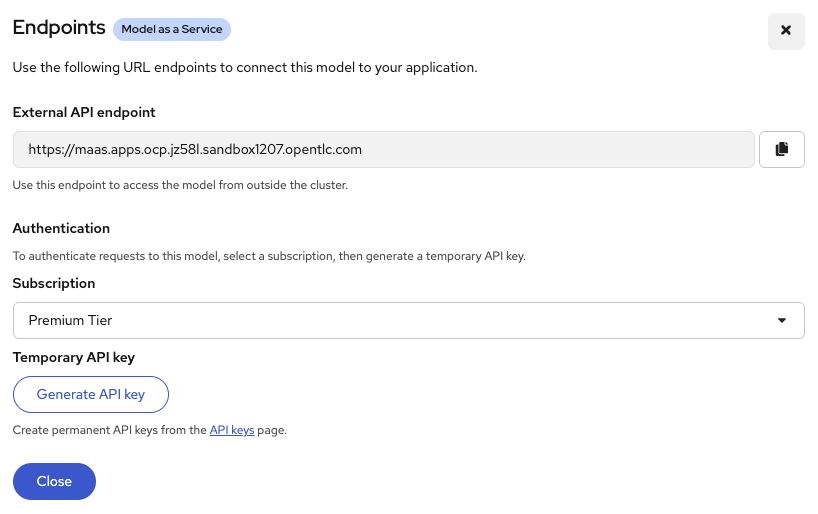
-
Close the dialog and click Add to playground to confirm the endpoint is live and responding. The Playground creates a temporary API key on your behalf and connects to the endpoint so you can test it quickly.
If the Configure Playground panel does not show up, refresh the page. -
In the Configure playground dialog, pick which model endpoints you want available in your project playground. Keep
qwen3-235b-a22bselected and click Configure.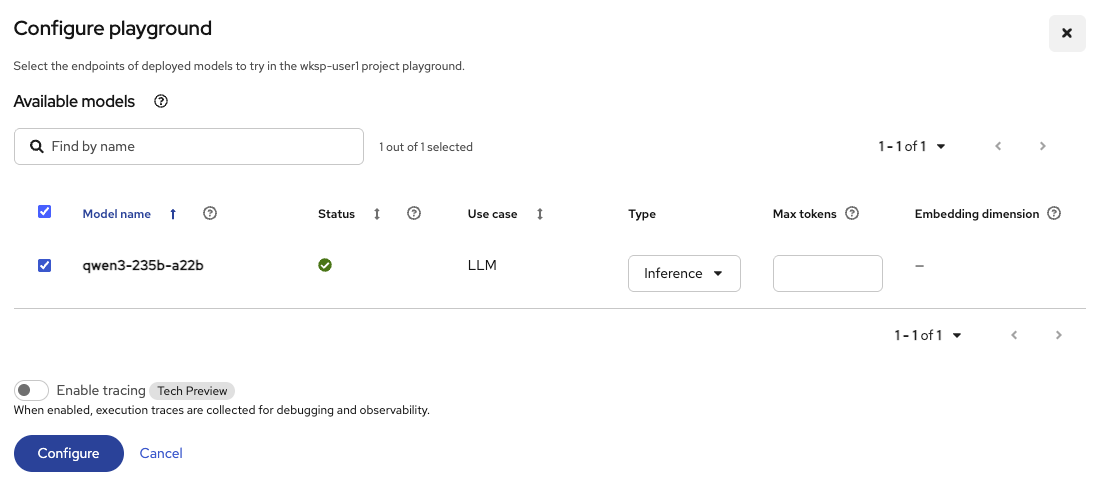
-
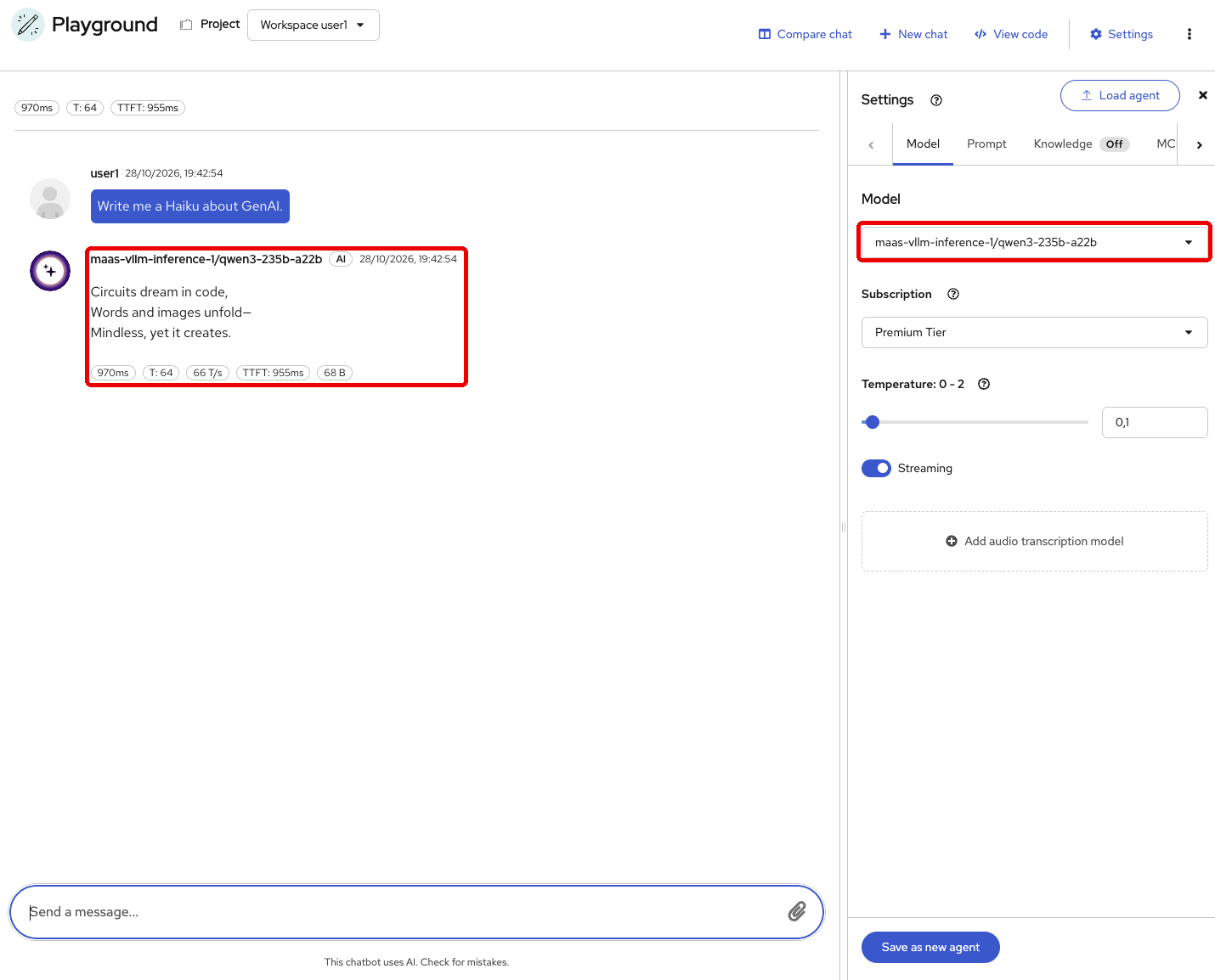
Send a prompt of your choice and confirm you get a response. Notice the quality of the response compared to what you saw from Qwen3 0.6B. This is a 235-billion parameter model running on GPU, much bigger and more powerful.
Exercise 5: Generate an API Key
MaaS uses API keys to control access to shared models, apply rate limits, and track usage. Earlier, the Playground created a temporary key on your behalf so you can test the model quickly. Now, let’s create your own API key to call the model from code or other tools.
-
Go to API Keys page, and click Create API Key.
-
Give the key a name, for example
my-key. You can add a description if you wish. -
Select the Premium Tier subscription. The subscription defines the model you have access to and the rate limits for the key. Observe that you have 10,000 tokens per minute as the rate limit for
qwen3-235b-a22b.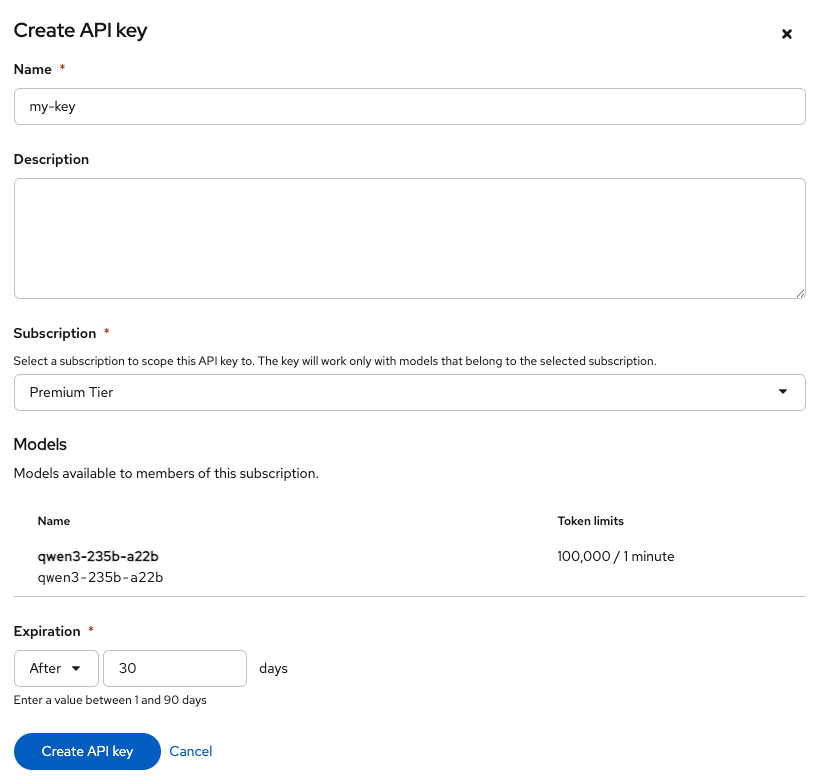
-
Change the expiration date by selecting After from the drop down and make it 30 days.
-
Click Create API Key.
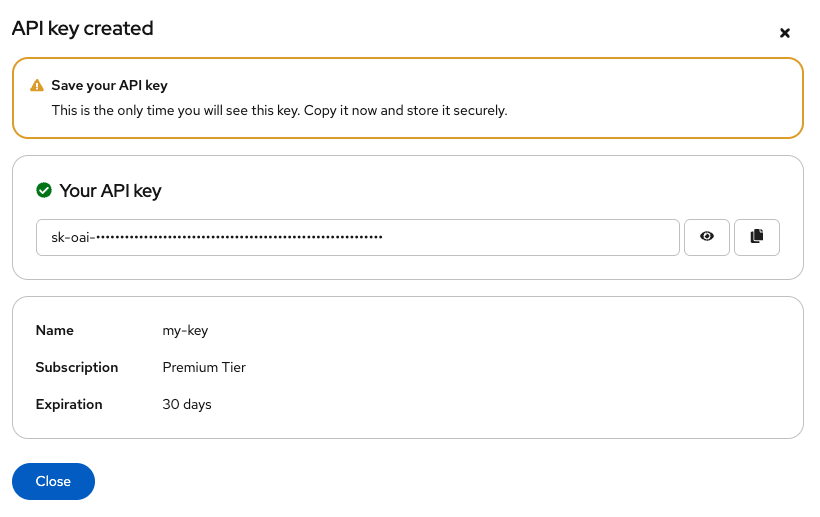
-
Copy the generated key and paste it into the field below for use during the exercises. You won’t be able to view the key again after closing the dialog.
| Each user generates their own key. The MaaS gateway tracks usage per key, which is how the platform enforces rate limits and produces the per-user usage data. |
Exercise 6: Consume the MaaS Endpoint with cURL
With your key in hand, let’s call the model directly from the terminal.
-
Navigate to the Terminal tab. Set your API key and endpoint URL as environment variables. Use the key you saved in the notepad above and the endpoint URL from the endpoint detail page:
export MAAS_API_KEY=<paste-your-api-key> export MAAS_URL=https://maas.{openshift_cluster_ingress_domain} -
Send a completion request:
curl -sk $MAAS_URL/v1/chat/completions \
  -H "Authorization: Bearer $MAAS_API_KEY" \
  -H "Content-Type: application/json" \
  -d '{
    "model": "qwen3-235b-a22b",
    "messages": [{"role": "user", "content": "Write me a haiku about GenAI Playground"}],
    "max_tokens": 256
  }' | jq -r '.choices[0].message.content'
You should see a response from
qwen3-235b-a22b. The API is OpenAI-compatible, so any application that already talks to OpenAI can point at this endpoint instead, with no code changes beyond swapping the base URL and key.
Exercise 7: (Optional) Connect OpenCode to MaaS
Fed Aura Capital’s developers can use shared models for coding assistance too. In this exercise, you’ll connect OpenCode, an AI coding assistant included in your workbench, to the same MaaS endpoint you used with cURL.
Sending source code and prompts to an external model provider can raise confidentiality concerns for the bank. By connecting OpenCode to a self-hosted model through MaaS, developers can get coding assistance while keeping model requests inside the bank’s environment.
MaaS also lets teams reuse centrally managed models without deploying their own. Its OpenAI-compatible API allows developers to connect coding tools that support a custom endpoint, while the platform team manages model access and infrastructure.
You’ll configure three values: the endpoint URL, your API key, and the model name.
| For this workshop, we extended OpenShift AI’s Code Server workbench image by installing OpenCode. The platform provides base workbench images and lets you build custom images based on them. |
Create and Configure Your Workbench
-
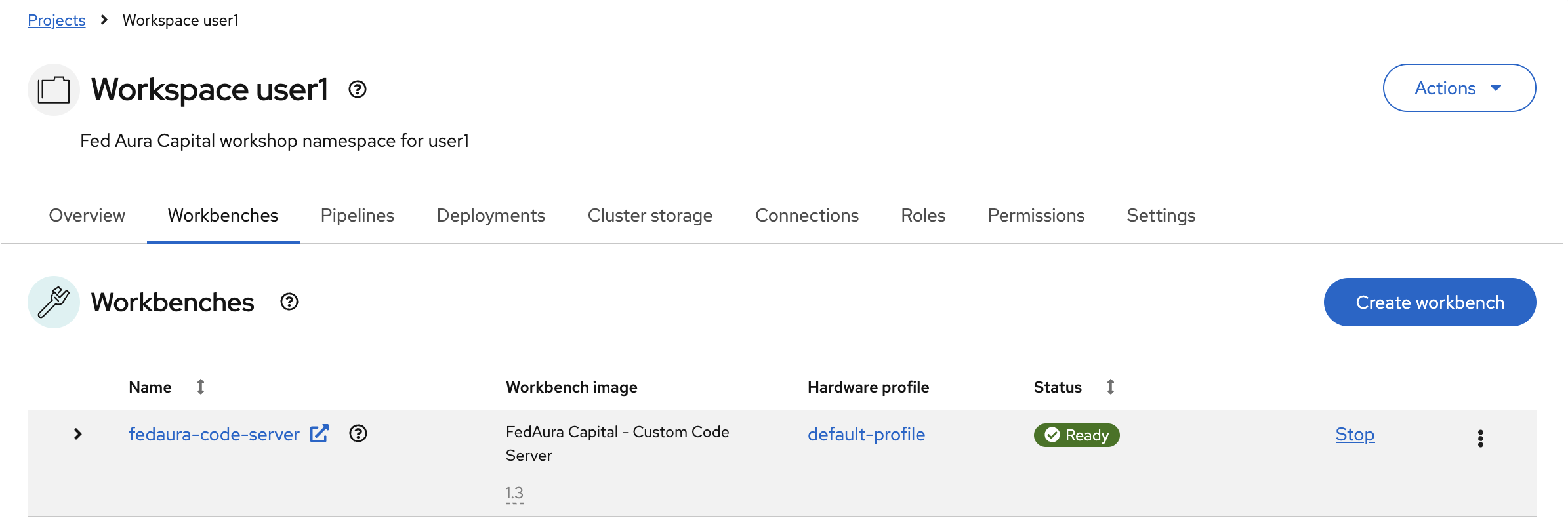
Navigate to OpenShift AI Dashboard > Projects > wksp-user1. Click Create workbench and fill in the form:
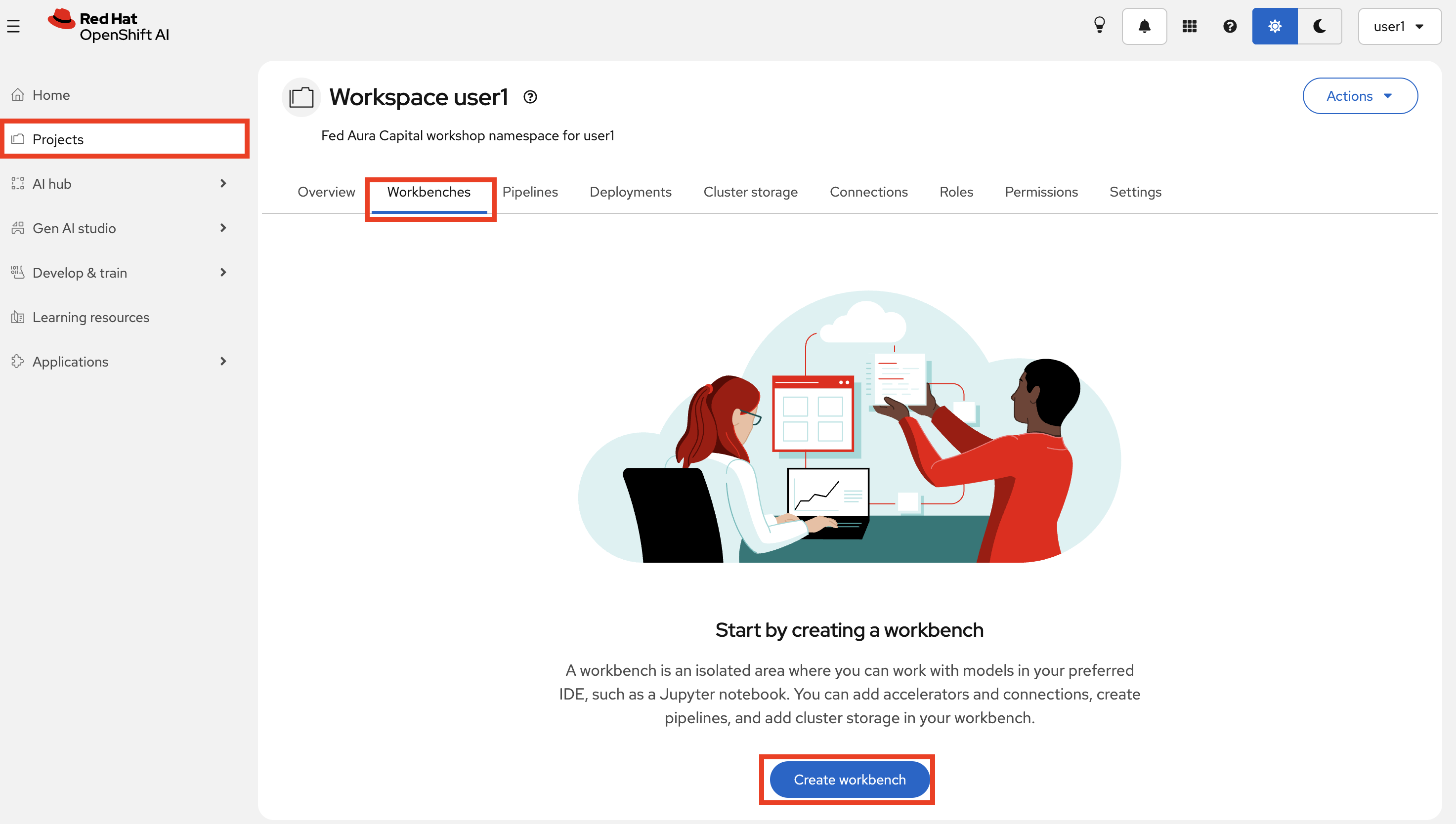
-
Name:
fedaura-code-server -
Image selection:
FedAura Capital - Custom Code Server(includes OpenCode, OpenShell CLI, Python 3.12, and Code Server) -
Hardware profile:
default-profile
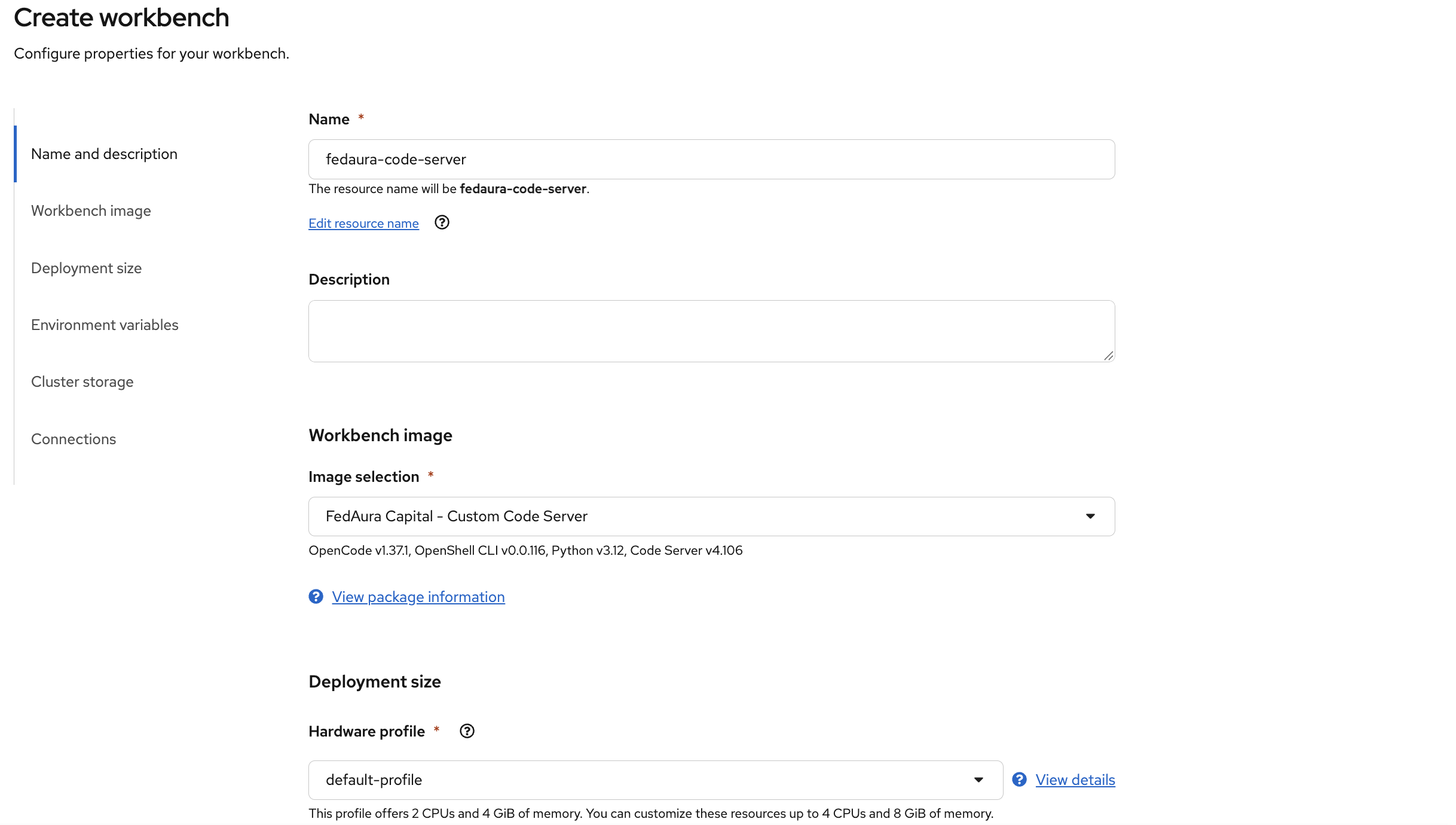
-
-
Scroll down to Environment variables and select Secret > Key / value. Click Add variable, then add two more key/value pairs. Fill in the three rows using the table below, including your API key from Exercise 5:
Key Value OPENCODE_API_URL https://maas.{openshift_cluster_ingress_domain}/v1 OPENCODE_API_KEY <paste your API key from above> OPENCODE_MODEL_NAME qwen3-235b-a22b 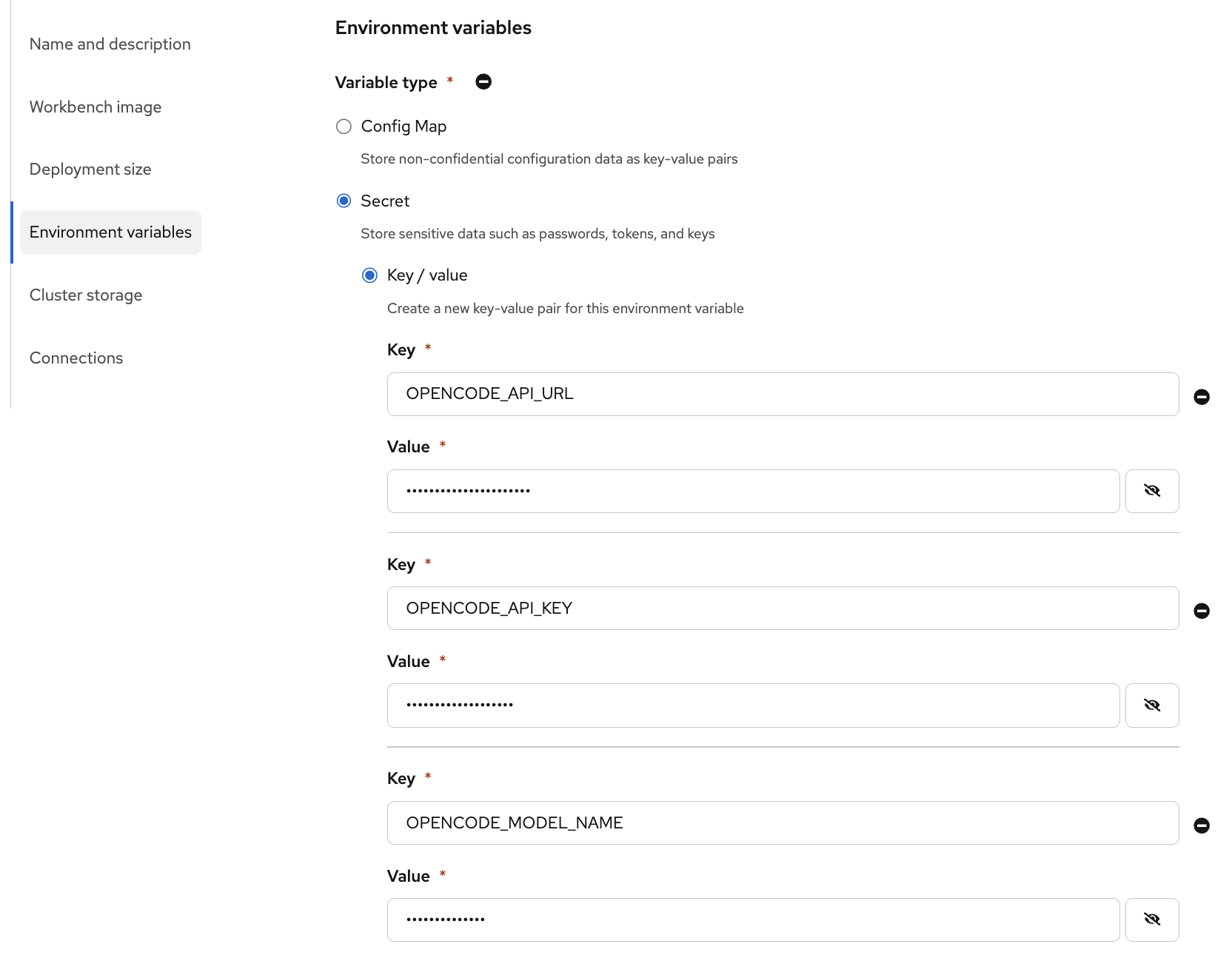
-
Click Create workbench and wait for its status to change from Starting to Running.
-
Use the Workbench tab in the top menu bar, or click the workbench name to open Code Server in a new tab.
=== Try OpenCode
-
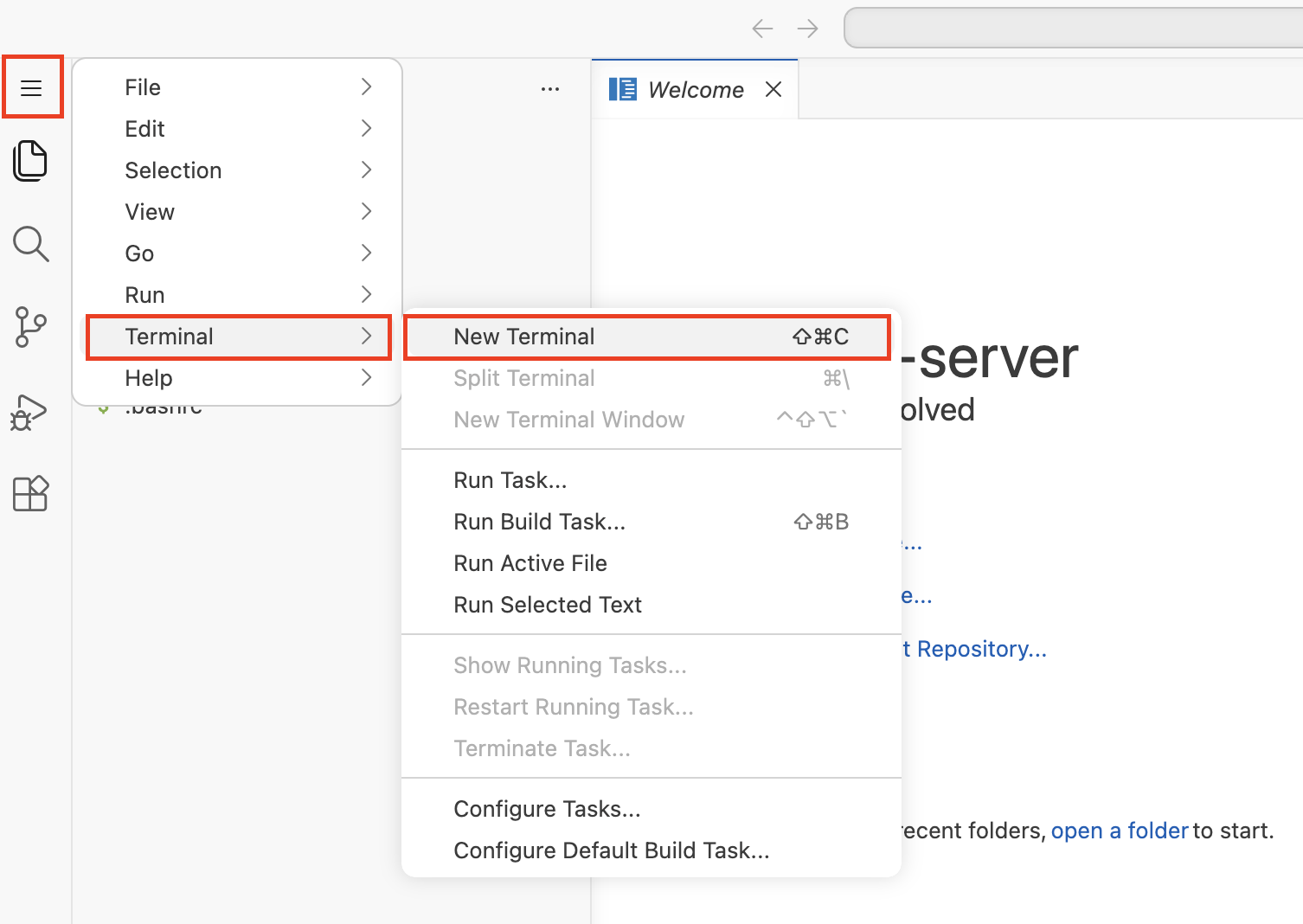
In the Code Server, open the menu at the top left and select Terminal > New Terminal.
-
Run the following command to start OpenCode, configured to use your MaaS endpoint:
opencode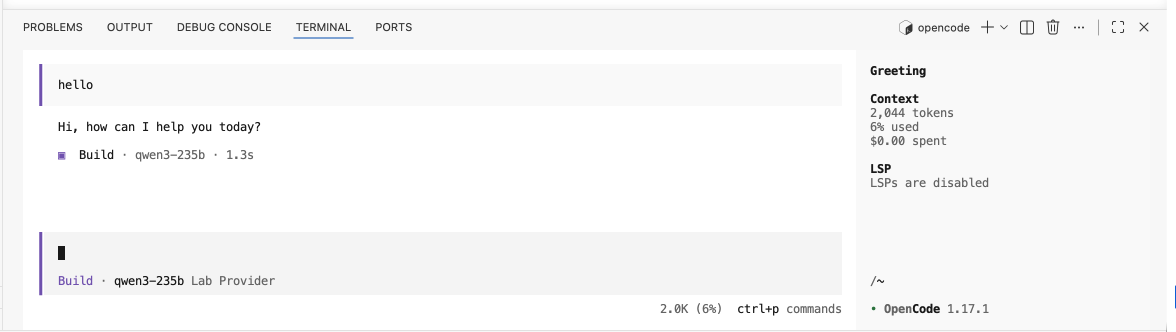
-
Enter the following prompt in OpenCode and review the generated function:
Write a Python function that calculates the monthly mortgage payment given the principal, annual interest rate, and total number of monthly payments. Handle a zero interest rate.
OpenCode now uses the bank’s shared model through MaaS. You’ve reused the same endpoint and API key with another tool, without deploying another model.
| Coding agents can also access files and run commands. In OpenShell Agent Sandboxing, you’ll explore how to control those actions. |
Exercise 8: Observe Your Usage
-
On OpenShift AI dashboard go to Observe & monitor > Dashboard and click on
qwen3-235b-a22b. Select the Usage (logs) tab: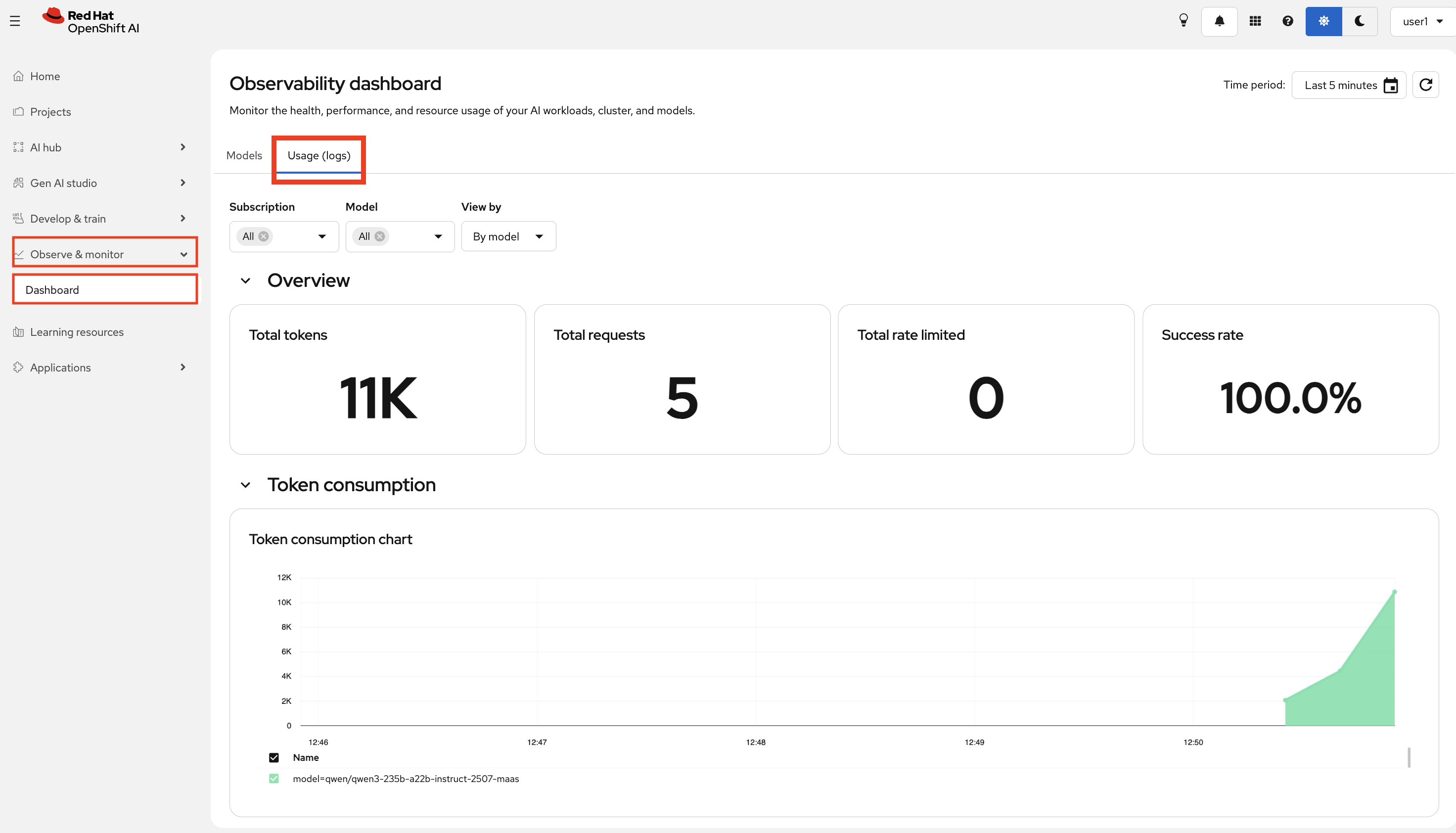
-
You should see the token consumption from your curl call, Playground and OpenCode sessions. This is the data Fed Aura Capital’s platform team can also use to track adoption and manage capacity across teams.
Self-hosted and External Models
The model requests in these exercises go through MaaS to a self-hosted model running in an OpenShift cluster. This lets application teams use an API while the platform team manages the model infrastructure and access.
A gateway can also provide access to external model providers.
API key · rate limit · routing
on-cluster · vLLM
external API
A question for Lenora
Before we close this section, in the Playground, try asking something specific about Fed Aura Capital.
What is Fed Aura Capital's minimum credit score requirement for a conventional loan?Observe the response. qwen3-235b-a22b is a powerful general-purpose model, but it has no knowledge of Fed Aura Capital’s specific policies. Without access to the company’s knowledge base, it can only give a generic answer, or make one up.
Next steps:
The model can generate fluent text, but it doesn’t know anything about Fed Aura Capital’s specific policies or customer data. In the next section, you will connect it to that knowledge using RAG (Retrieval-Augmented Generation) and watch Lenora go from guessing to answering accurately.
Section Summary
You started with a model in a catalog and ended with a production-grade inference platform. Here is what that progression looked like:
-
Model Catalog - models don’t just appear in production. They go through a governed library with metadata about origin, license, and validation status before anyone can deploy them.
-
Single-replica vLLM - deploying a model is straightforward, but a single replica under concurrent load becomes a bottleneck with no intelligent routing.
-
llm-d - adding replicas only helps if requests are routed smartly. llm-d tracks replica load and distributes work to minimize wait time across the pool. The API and the user experience stay identical. The improvement is entirely under the hood.
-
Models as a Service - even well-distributed inference creates chaos if every team manages their own stack. MaaS puts a shared gateway in front: one endpoint, scoped API keys, rate limits, and usage visibility per consumer.
Key takeaway:
Each layer solved a real problem the previous one left open. The result is not just a running model, it is a platform that scales, governs access, and gives the platform team observability over who uses what.
| Want to understand how MaaS is configured under the hood (the Kubernetes custom resources, subscription model, and auth policy chain)? See the optional 2.5 MaaS Configuration page. |