Advanced: Predictive AI with AutoML
| This is an advanced optional section. It requires additional time and is intended for participants who want to understand how the Risk MCP’s predictive model was trained. The main section exercises are complete. This section is self-contained and can be done independently. |
Where Does the Prediction Come From?
In Exercise 4, you watched Lenora call uw_predict_loan_approval through the Risk MCP server. The response was not a rule; it was a machine learning prediction. But where does that prediction come from?
Behind the uw_predict_loan_approval tool is a scikit-learn classification model trained on historical loan application data. The model learned which combinations of DTI ratio, LTV, credit score, and asset sufficiency correlate with loan outcomes, and it applies that learning to new applications at inference time.
Training that model by hand (selecting algorithms, tuning hyperparameters, tracking experiments) would take days. AutoML automates the entire process. It runs multiple algorithm configurations in parallel, compares the results, and surfaces the best-performing model, all logged to MLflow so every run is reproducible and auditable.
This is how Fed Aura Capital connects classical machine learning to generative AI: the LLM orchestrates and decides what to ask, the ML model predicts, and AutoML keeps that model accurate as new loan data comes in.
Learning Objectives
By the end of this section, you will be able to:
-
Run an AutoML experiment from the OpenShift AI dashboard
-
Review the resulting experiment in MLflow and compare model runs
-
Understand how the trained model connects to the Risk MCP server
Exercise: Train the Loan Approval Model
-
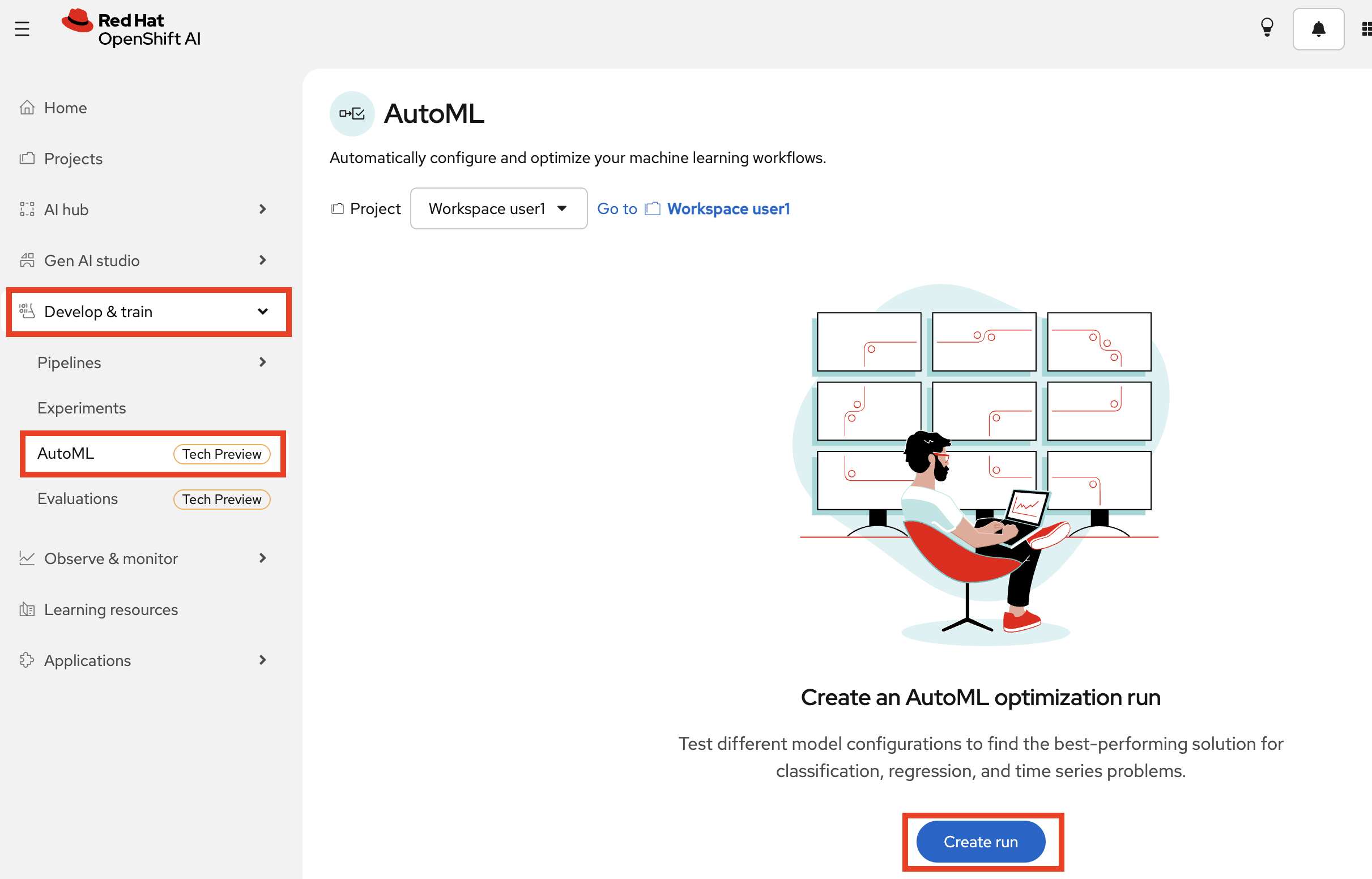
Navigate to OpenShift AI Dashboard > Develop & Train > AutoML.
-
Create a run called fed-aura-automl.
-
On the left side, under Documents, select the S3 connection automl from the dropdown. Click Select file from bucket, then Browse bucket and select
cleaned_loan_data.csv. This is a synthetic dataset of historical loan applications with known outcomes.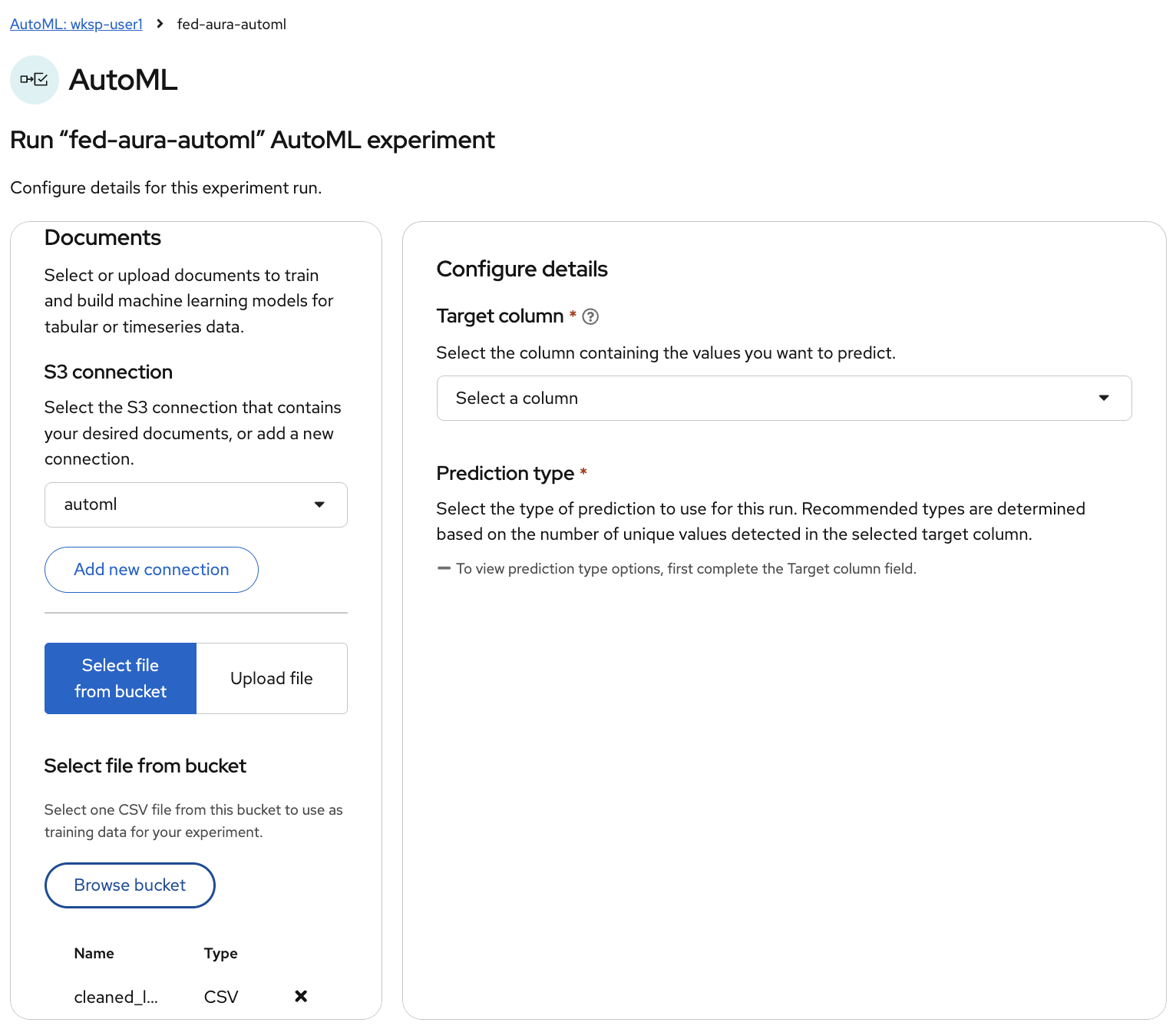
-
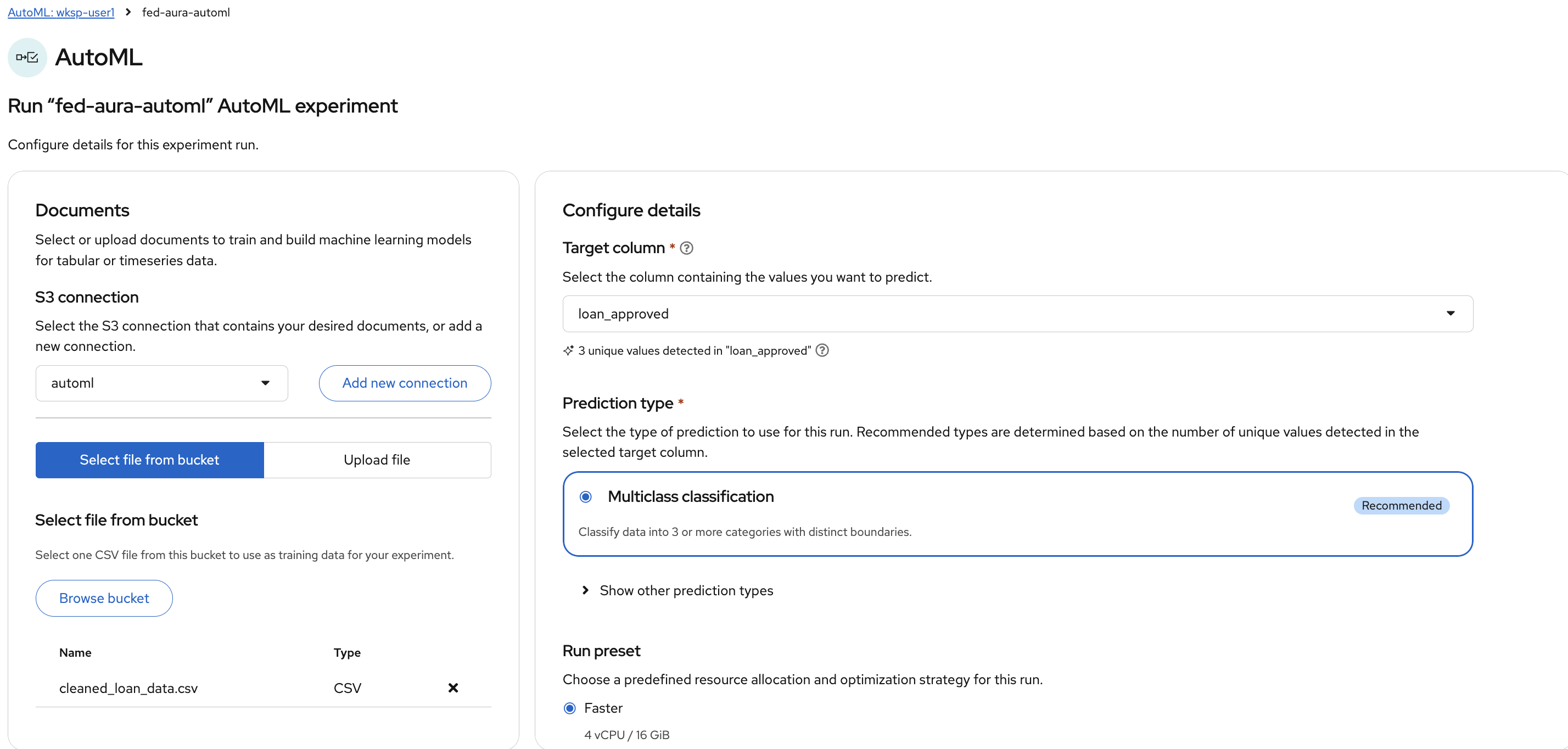
On the right side, configure the experiment details:
-
Target column:
loan_approved- the column the model will learn to predict. You’ll find it at the end of the list :) -
Prediction type: Multiclass classification (recommended) - the model will classify applications into approval categories
-
Run preset: Faster (4 vCPU / 16 GiB) - sufficient for this dataset size
-
Leave the rest default
-
-
Click Start run. AutoML will evaluate multiple algorithm configurations automatically. This takes a couple of minutes.
-
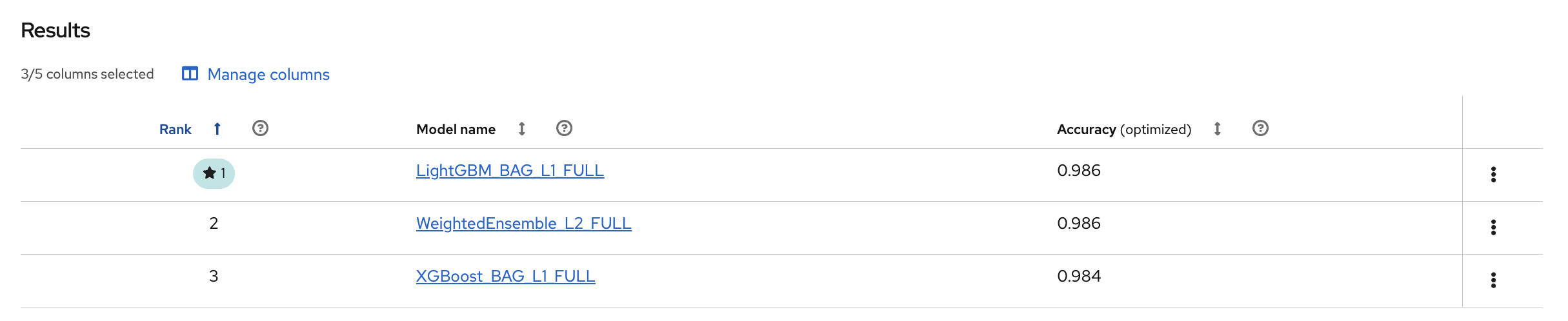
Once completed, the Results table shows the ranked models. In this case, LightGBM_BAG_L1_FULL came out on top with an optimized accuracy of 0.986:
-
Click on the model name to open Model details. Here you can see the full configuration (preset, label column, evaluation metric) along with tabs for Feature summary, Model evaluation, Confusion matrix, ROC curve, and Precision recall:
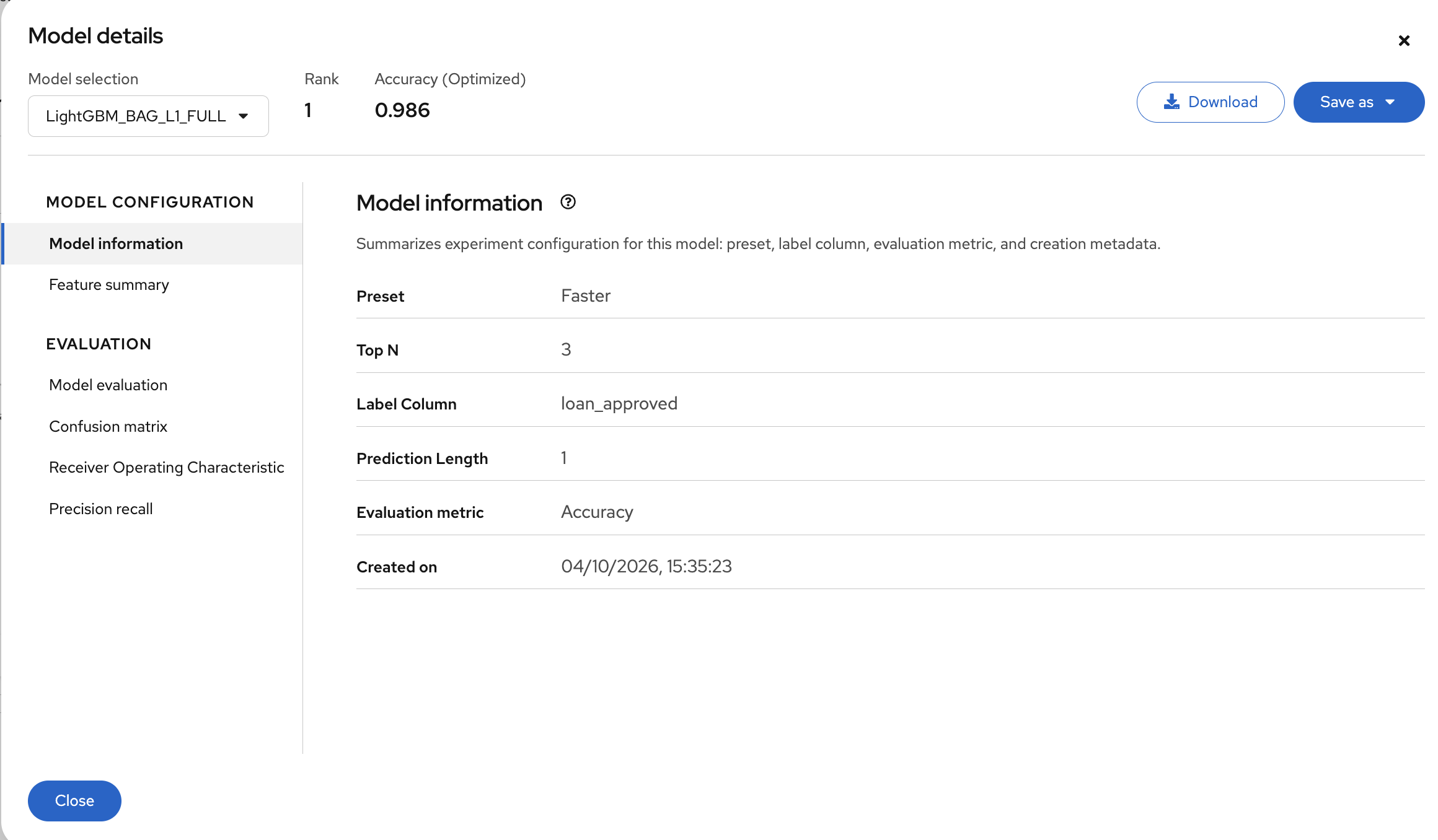
You can also Download the report or Save the model to the Model Registry directly from here. Fed Aura is already running the latest model in the Risk MCP server, so you don’t need to do that step for this exercise.
| In production, this training pipeline would run on a schedule (weekly or monthly) as new loan outcome data arrives. AutoML ensures the model stays calibrated without requiring a data scientist to manually tune it each time. |
Section Summary
What You Accomplished
-
Ran an AutoML experiment from the OpenShift AI dashboard that evaluated multiple algorithm configurations against historical loan application data
Key Takeaways
-
AutoML reduces the time from raw data to deployed model: algorithm selection, hyperparameter tuning, and experiment tracking are automated rather than manual
-
It provides full lineage for every run: data, configuration, metrics, and the resulting model artifact are all linked and auditable
-
The connection between AutoML and the MCP server is the Model Registry. The MCP server loads whatever version is marked latest, so retraining and redeploying the model requires no changes to the agent code
-
Classical ML and generative AI are complementary: the LLM handles language, reasoning, and orchestration; the ML model handles structured prediction tasks that require statistical pattern recognition