Quarkus Extensions
List extensions
Ready to dive into advanced Quarkus development? Let’s learn how easily Quarkus allows developers to extend for building a vibrant ecosystem.
Think of Quarkus extensions as your project dependencies. Extensions configure, boot and integrate a framework or technology into your Quarkus application. They also do all of the heavy lifting of providing the right information to GraalVM for your application to compile natively.
Quarkus aims to provide a support for a full extension ecosystem, to make it easy to discover and consume 3rd party extensions, as well as providing easier version management.
Retrieve the list of possible extensions using the Maven plugin. Run this in the Terminal:
mvn quarkus:list-extensionsYou can see the list of ~538 different extensions available to you in the output:
[INFO] Current Quarkus extensions available:
[INFO]
[INFO] ✬ ArtifactId                                         Extension Name
[INFO] ✬ blaze-persistence-integration-quarkus              Blaze-Persistence
[INFO] ✬ camel-quarkus-activemq                             Camel ActiveMQ
[INFO] ✬ camel-quarkus-amqp                                 Camel AMQP
[INFO] ✬ camel-quarkus-arangodb                             Camel ArangoDb
[INFO] ✬ camel-quarkus-as2                                  Camel AS2
[INFO] ✬ camel-quarkus-atlasmap                             Camel AtlasMap
[INFO] ✬ camel-quarkus-atom                                 Camel Atom
[INFO] ✬ camel-quarkus-attachments                          Camel Attachments
[INFO] ✬ camel-quarkus-avro                                 Camel Avro
[INFO] ✬ camel-quarkus-avro-rpc                             Camel Avro RPC
[INFO] ✬ camel-quarkus-aws2-athena                          Camel AWS 2 Athena
[INFO] ✬ camel-quarkus-aws2-cw                              Camel AWS 2 CloudWatch
...
Adding an extension is similarly easy. With Maven, you can add extensions using mvn quarkus:add-extension -Dextensions="extension1,extension2,…". The extension name can be the maven groupId/artifactId name of the extension: e.g. io.quarkus:quarkus-agroal. But you can pass a partial name and Quarkus will do its best to find the right extension. For example, agroal, Agroal or agro will expand to io.quarkus:quarkus-agroal. If no extension is found or if more than one extensions match, you will see a warning and a list of possible matches in the command result.
When you run Quarkus applications, the list of extensions enabled are shown in the output, such as:
INFO [io.quarkus] (main) Installed features: [cdi, kubernetes, resteasy-reactive, smallrye-context-propagation, vertx]|
In Live Coding mode, Quarkus will monitor the state of |
Add an extension
Later on in this lab we’ll be using Jackson serialization support for RESTEasy Reactive, so let’s add that extension here. In the Terminal, run the following command to add the RESTEasy Reactive Jackson extension to your project:
mvn quarkus:add-extension -Dextensions="rest-jackson"You should see
[INFO] [SUCCESS] ✅ Extension io.quarkus:quarkus-rest-jackson has been installedThe result of this command is a new <dependency> added to our pom.xml which you can see by looking at the differences you’ve made up till now.
Select the Source Control view and then select pom.xml:
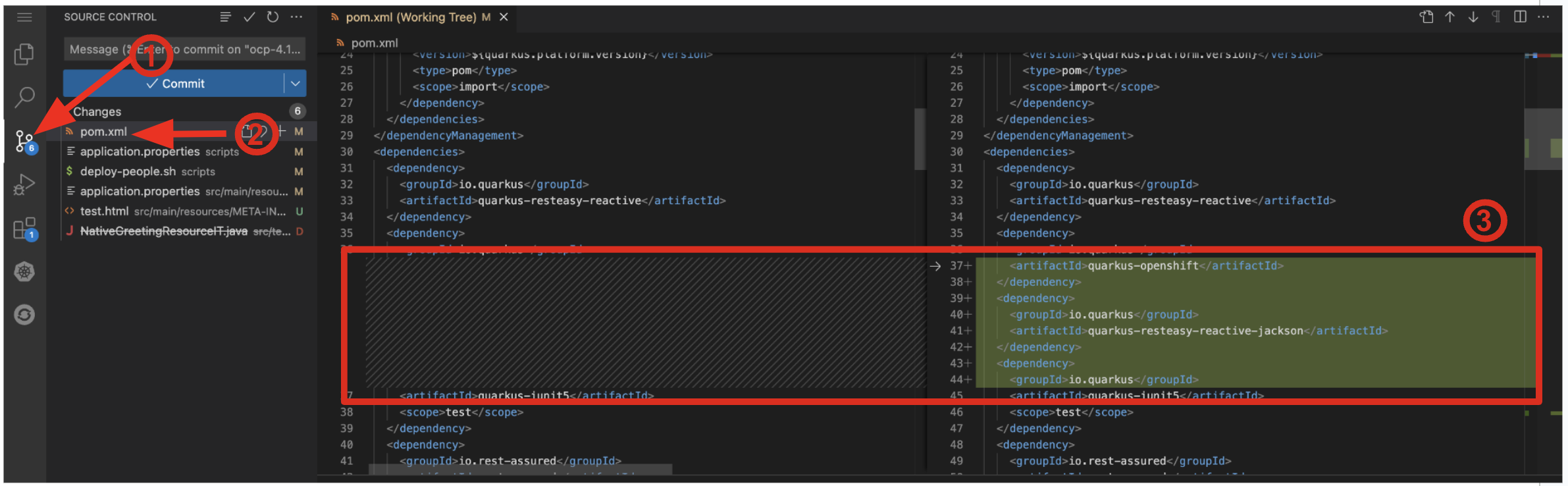
You’ll see all the changes to pom.xml since you started, including the new extensions we’ve added.
You may see other apparent differences due to whitespace and/or the re-shuffling of XML elements when you ran mvn quarkus:add-extension.
There are many other git and GitHub operations like this one that you can perform directly in the IDE for real projects (e.g. committing, branching, merging, push/pull, log viewing, etc).
Go back to the Explorer view in CodeReady (to see the tree of files once again).
Writing your own extension
Quarkus extensions add a new developer focused behavior to the core offering, and consist of two distinct parts, buildtime augmentation and runtime container. The augmentation part is responsible for all metadata processing, such as reading annotations, XML descriptors etc. The output of this augmentation phase is recorded bytecode which is responsible for directly instantiating the relevant runtime services.
This means that metadata is only processed once at build time, which both saves on startup time, and also on memory usage as the classes etc that are used for processing are not loaded (or even present) in the runtime JVM.
Writing a Quarkus extension is beyond the scope of this lab, so consult the Extension Author’s Guide for more detail on writing your own extension.
Congratulations
Quarkus aims to provide a support for a full extension ecosystem, to make it easy to discover and consume 3rd party extensions, as well as providing easier version management.
We’ll be adding additional extensions as we go along in other sections of this workshop.