Securing Your Namespaces
The secured pipeline ensures that only properly signed, scanned, and approved images are built. But what stops someone from bypassing the pipeline entirely and deploying an unsigned image directly with oc or kubectl? That is where the Sigstore Policy Controller comes in.
The Policy Controller is a Kubernetes admission controller that intercepts pod creation requests and verifies container image signatures and attestations before the pod is allowed to run. In Parasol’s secured production namespace, three policies must be satisfied:
-
The image must be signed (by Tekton Chains or Red Hat)
-
The image must carry proof of a signed commit in its SLSA attestation
-
The image must have a signed release approval attestation
Section 1: Testing policy enforcement
Exercise 1: Try to deploy an unsigned image
-
Open Dev Spaces (any workspace — you just need a terminal). In Dev Spaces, click on New Terminal:
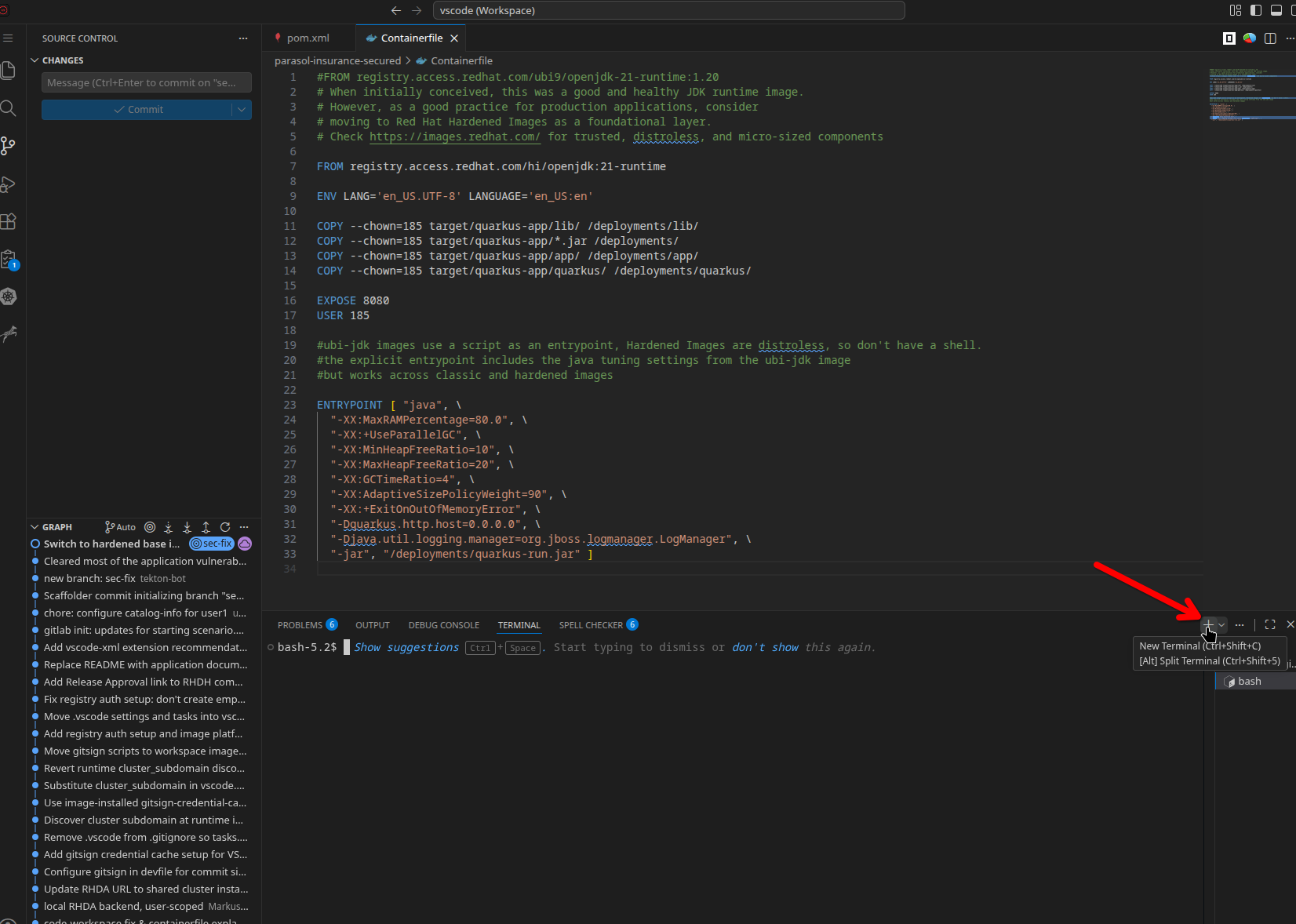
-
In the terminal, try to deploy an unsigned image to the secured production namespace:
oc create deployment test-unsigned --image=docker.io/library/nginx:latest -n {user}-secured-prod -
The deployment is rejected by the admission webhook. The output is verbose — filter it to see just the violated policies:
oc create deployment test-unsigned --image=docker.io/library/nginx:latest -n {user}-secured-prod 2>&1 | grep "failed policy:"failed policy: parasol-image-signature-required failed policy: parasol-signed-commit-required failed policy: parasol-release-approval-required
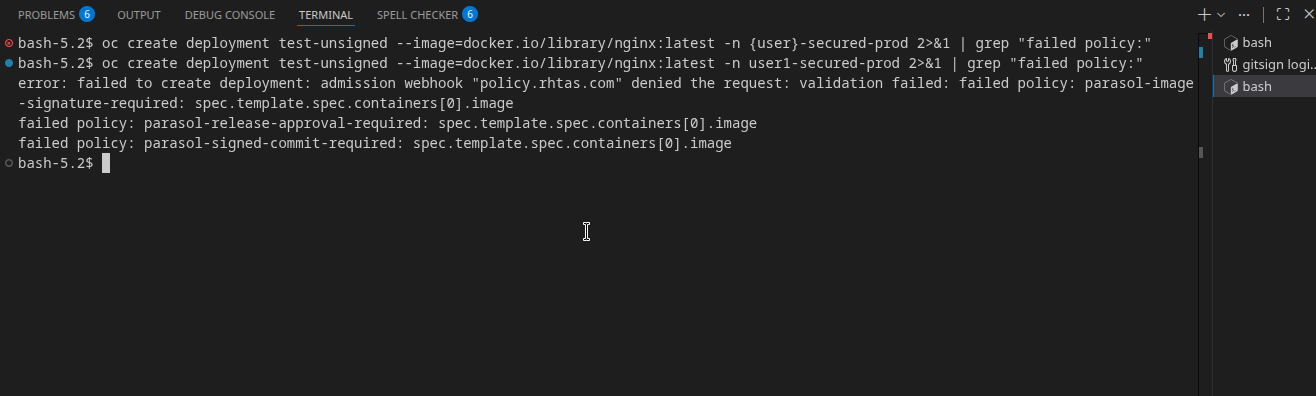
All three policies failed — the nginx image is not signed by Chains or Red Hat, has no SLSA attestation, and has no approval.
Exercise 2: Try to deploy a signed but unapproved image
-
Now try deploying the temporary image that was built during the MR check (signed by Chains, but not approved):
oc create deployment test-no-approval --image=quay.{openshift_cluster_ingress_domain}/{user}/parasol-insurance-secured:mr-1 -n {user}-secured-prod -
This deployment is also rejected. Filter the output again:
oc create deployment test-no-approval --image=quay.{openshift_cluster_ingress_domain}/{user}/parasol-insurance-secured:mr-1 -n {user}-secured-prod 2>&1 | grep "failed policy:"failed policy: parasol-release-approval-required

The image signature check passes (it was signed by Chains), but the release approval policy fails — the MR check image was never approved for production.
Exercise 3: Verify the legitimate deployment works
-
Confirm that the production deployment (the one deployed via the tag-promote pipeline) is running:
oc get pods -n {user}-secured-prodYou should see the
parasol-insuranceandparasol-dbpods running normally — these images passed all three policies. -
Clean up the failed test deployments:
oc delete deployment test-unsigned test-no-approval -n {user}-secured-prod 2>/dev/null
Why is this important?
Pipelines are a critical security control, but they can be bypassed — someone with namespace access could use oc apply to deploy any image. The Policy Controller closes this gap:
-
It operates at the Kubernetes admission layer, below the pipeline
-
It verifies signatures and attestations at deployment time, not build time
-
It applies to all pod creation, regardless of how the deployment was initiated (ArgoCD,
oc, Helm, manual YAML, etc.) -
It creates defense in depth — even if the pipeline is compromised, unsigned images with missing required attestations (and values therein) cannot run
How was it done?
To keep the exercise readable, we have added the details below. Expand to read how it was done.
Open to view implementation details
The Sigstore Policy Controller is installed via the RHTAS operator and configured through ClusterImagePolicy Custom Resources.
Three policies are applied to every image deployed in the {user}-secured-prod namespace:
| Policy | What it checks |
|---|---|
|
Image must be signed by either Tekton Chains (keyless, via Fulcio/Rekor) or Red Hat (release3 public key) |
|
SLSA provenance attestation must contain a |
|
A custom attestation ( |
Each policy has two authorities (OR logic):
-
Tekton Chains / User identity — verifies signatures from the cluster’s Sigstore infrastructure (Fulcio + Rekor)
-
Red Hat signed — verifies signatures using the Red Hat release3 public key, allowing Red Hat base images (like the PostgreSQL database) to pass without Chains signatures
The namespace is opted into enforcement by the label:
metadata:
  labels:
    policy.rhtas.com/include: "true"
Only namespaces with this label are subject to the policies. Build namespaces, sandbox namespaces, and non-production environments are not labeled and are not affected.
Verify
At this point, you should have:
-
Attempted to deploy an unsigned image and seen it rejected by all three policies
-
Attempted to deploy a signed but unapproved image and seen it rejected by the approval policy
-
Confirmed that the legitimate production deployment is running
-
Understood how the Policy Controller provides defense in depth beyond pipelines
Congratulations!
You have completed the Secured Software Supply Chain module. You have experienced the full journey from vulnerability detection to production deployment, with security guardrails at every stage:
| Stage | Security control |
|---|---|
Code |
Red Hat Dependency Analytics identifies vulnerabilities in the IDE |
Commit |
Sigstore keyless signing ties every commit to a verified identity |
Sandbox build |
ACS scan + policy check provide early feedback (informational) |
Merge request |
Signature verification enforced; ACS policies block merge if violated |
Post-merge build |
Tekton Chains signs the image and generates SLSA attestations |
Tag promote |
Conforma validates the full attestation chain; SBOM uploaded to TPA |
Approval |
Signed human authorization required before production |
Deployment |
Policy Controller verifies signatures and attestations at admission time |
Every piece of evidence is cryptographically signed, stored in a transparency log, and independently verifiable. This is a SLSA Level 3 compliant software supply chain.