Section 4: Modernize Message-Driven Bean (MDB) to Reactive Messaging
Goal
Use MTA analysis and Developer Lightspeed to modernize the legacy Message-Driven Bean EmailIntakeMDB in parasol-insurance-eap:
-
Move from Java EE / JMS-style processing toward Quarkus with SmallRye Reactive Messaging (
@Incoming, CDI) -
Review an AI-generated patch before accepting changes
Modernizing legacy "Enterprise Java" (Java EE/Jakarta EE) applications is often a manual, error-prone process. This lab guide focuses on Developer Lightspeed—the AI feature of MTA, delivered through the MTA extension—which combines static code analysis with Large Language Models (LLMs) to automate the refactoring of legacy patterns into modern, cloud-native Quarkus code.
In Parasol Insurance’s EAP application, inbound email JSON arrives on the JMS queue java:/jms/queue/email-intake. The class com.parasol.mdb.EmailIntakeMDB is a @MessageDriven bean that implements MessageListener, looks up the payload from a TextMessage, and forwards it to EmailRoutingService / EmailStoreBean via @EJB injection.
In this lab, let’s transform that legacy EmailIntakeMDB into a modern Quarkus consumer using SmallRye Reactive Messaging.
The architectural shift: Synchronous vs. Asynchronous
Legacy Java EE relies on JMS (Java Message Service). While technically asynchronous, JMS in an MDB context often operates in a "blocking" mindset. The MDB container requires heavy resource-consuming threads to sit and wait for messages to arrive.
Reactive Messaging (via brokers like Kafka) is built on the Reactive Streams standard. Instead of a thread "waiting," the system uses a non-blocking stream. When a message arrives at a Kafka topic (or mapped channel), it is "pushed" through a functional pipeline.
Why cloud-native?
-
Resource Efficiency: Thousands of messages are handled with only a few CPU threads.
-
Elastic Scaling: Reactive services scale up and down rapidly in Kubernetes because they lack the "baggage" of an EJB container.
-
Developer Experience: Quarkus replaces dozens of lines of XML or complex
@ActivationConfigPropertywith a simple@Incomingannotation.
Exercise 1: Review analysis for EmailIntakeMDB
The first step is to review the Analysis from our previous lab.
In the Analysis panel search box type the class name EmailIntakeMDB.
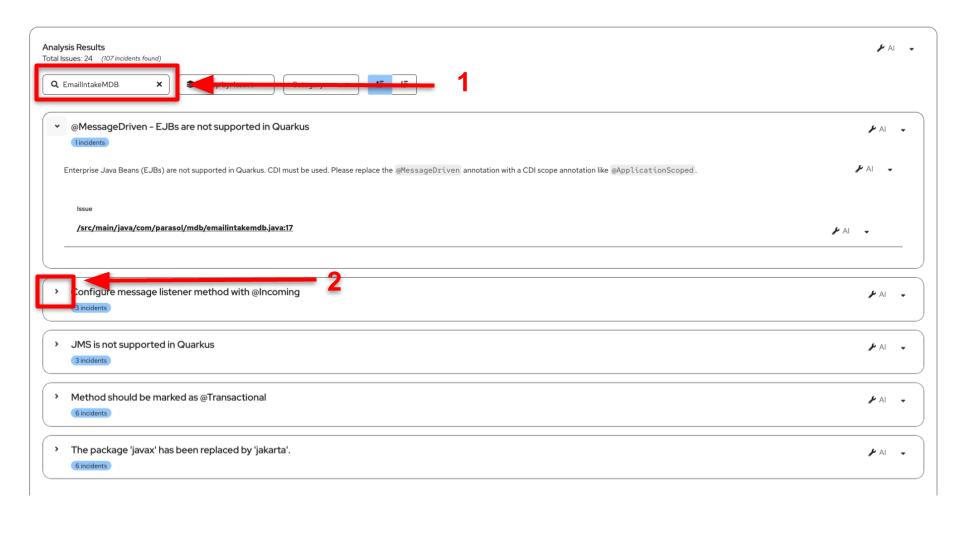
| The findings below are informational. No action is required yet. |
Let’s review the issues the static code analyzer has reported. The issues are reported in a list as shown in the image above. Click on the > icon to get more details. You should be able to see findings similar to the following.
-
@MessageDriven/ MDB - EJBs are not supported in Quarkus. Enterprise Java Beans (EJBs) are not supported in Quarkus. CDI must be used. Please replace the@MessageDrivenannotation with a CDI scope annotation like@ApplicationScoped. -
Configure message listener method with
@Incoming. ThedestinationLookupproperty (java:/jms/queue/email-intake) can be migrated by annotating a message handler method (typicallyonMessage) withorg.eclipse.microprofile.reactive.messaging.Incoming, indicating the channel name as a value. For example:// Modernized Quarkus-style consumer @ApplicationScoped public class EmailIntakeMDB { @Incoming("email-intake") public void onMessage(String json) { // Route and store the email payload } } -
JMS is not supported in Quarkus. References to Java EE / Jakarta EE JMS types (
Message,TextMessage,MessageListener) should be removed and replaced with SmallRye / MicroProfile Reactive Messaging equivalents. -
@EJBinjection is not supported. Replace@EJBwith CDI@InjectforEmailRoutingServiceandEmailStoreBean(those collaborators will also move to CDI over time). -
The package
javaxhas been replaced byjakarta. Replacejavax.imports with theirjakarta.counterparts where still needed.
Exercise 2: Generate and review an AI solution
-
Now that we understand the issues of Java EE to Quarkus migration in the context of email intake messaging, ask the LLM to generate curated fixes for this scenario.
Developer Lightspeed can request a fix for a single issue, but it can also request a fix for the entire file. Click on the drop down menu as shown in the image below, and select the
Filesoption. This will group all the issues together.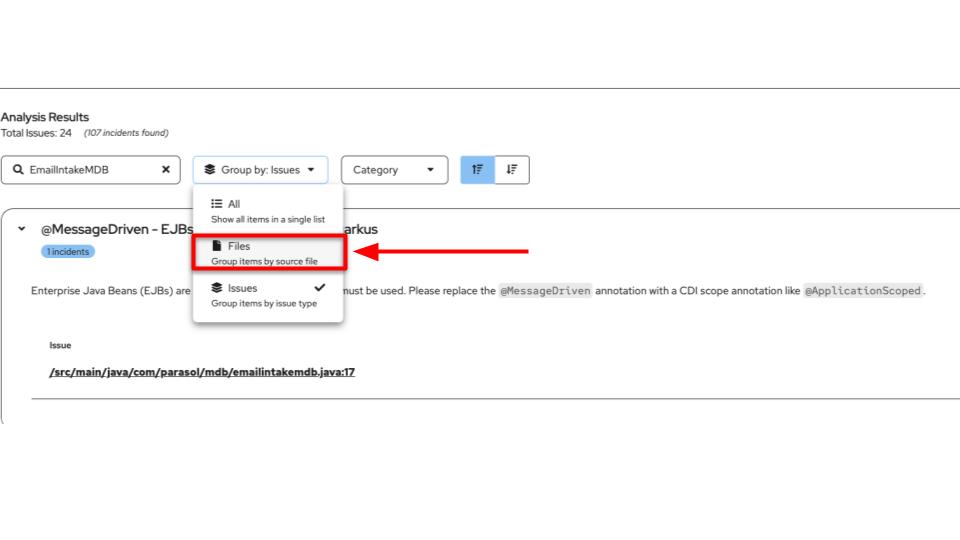 Figure 2. EmailIntakeMDB
-
Next click on the
AIdropdown next to theEmailIntakeMDB.javafilename as shown in the image below and clickGet Solution. This will trigger a new tab that will now send the entire context to the LLM. The context includes the issue itself, but it also includes more details like examples, and what is expected as a fix. This approach helps engineer the context in a way which is more specific to the requirements. A chat-bot would usually be a free flow of questions and messages. Here the context is prepared by Developer Lightspeed based on the static code analysis, in order to get the best results without wasting time or tokens.Make sure you click the AIdropdown next to the file name (EmailIntakeMDB.java), not the one at the top of the Analysis Results panel. Clicking the top-level dropdown will analyze the entire application across all files, which takes much longer and is not what we want for this exercise.
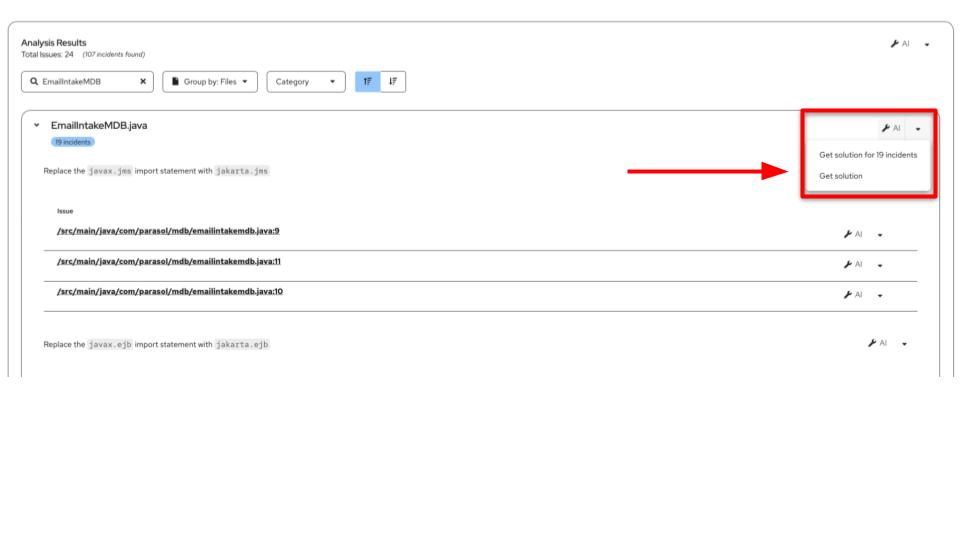
-
The results start to appear in the
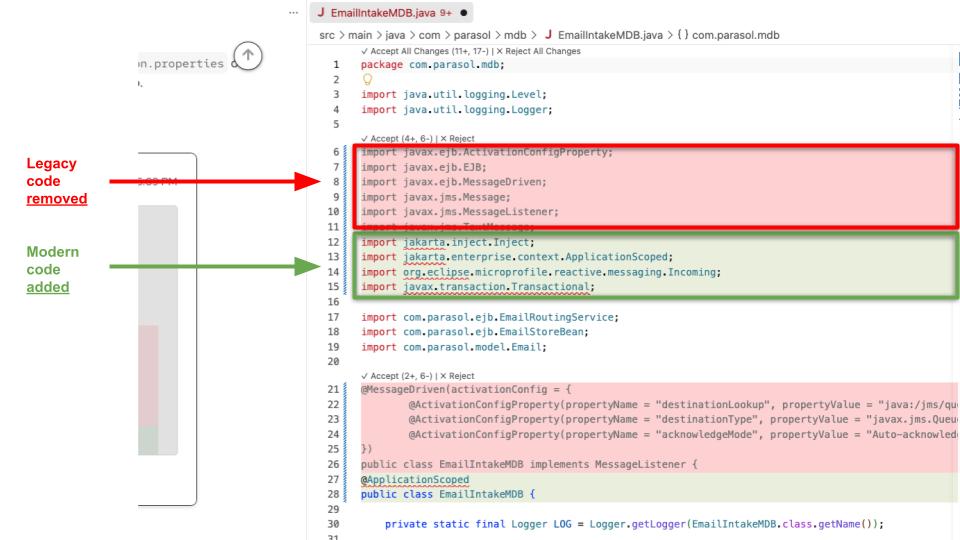
MTA Resolution Detailstab. You can note that the LLM provides additional information that is useful for developers, it describes the chain of thought, and finally sends back a git patch for us to review. At this moment we have 3 options, "Review", "Accept" and "Reject". Lets review by clickingReview in Editor, which should open up the editor window with details about the code. Notice that theRedhighlight is for the code that has been removed and theGreenhighlight is for the code that has been added by Developer Lightspeed.
| Generations are closely linked to the analysis. This means every time a new generation is created and accepted the analysis re-runs. If you try to access the analysis panel during generations, it will not be active. This is by design. |
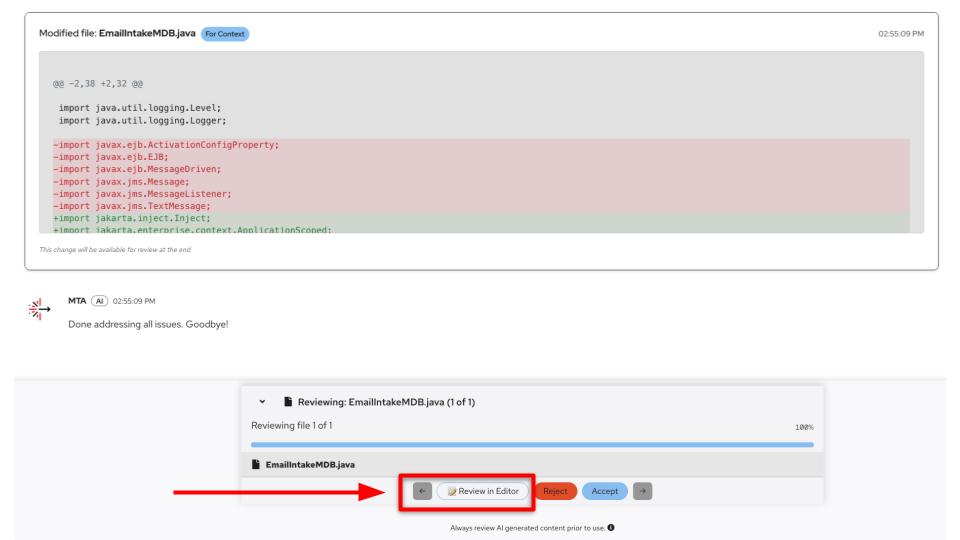
Let’s review the kinds of changes you should expect for EmailIntakeMDB.
JMS / EJB imports and annotations are removed. CDI and Reactive Messaging imports are added:
import jakarta.enterprise.context.ApplicationScoped;
import jakarta.inject.Inject;
import org.eclipse.microprofile.reactive.messaging.Incoming;
The following @MessageDriven activation config (bound to the EAP JMS queue) is removed, as it is no longer used:
@MessageDriven(activationConfig = {
        @ActivationConfigProperty(propertyName = "destinationLookup", propertyValue = "java:/jms/queue/email-intake"),
        @ActivationConfigProperty(propertyName = "destinationType", propertyValue = "javax.jms.Queue"),
        @ActivationConfigProperty(propertyName = "acknowledgeMode", propertyValue = "Auto-acknowledge")
})
A Quarkus-friendly handler is added. Note the use of @Incoming for the email-intake channel (derived from the original queue), @ApplicationScoped, and @Inject instead of @EJB. The core business flow — parse / route / store — should remain:
@ApplicationScoped
public class EmailIntakeMDB {

    @Inject
    EmailRoutingService routingService;

    @Inject
    EmailStoreBean emailStore;

    @Incoming("email-intake")
    public void onMessage(String json) {
        Email email = routingService.route(json);
        emailStore.add(email);
    }
}
Following image shows an example patch generated by Developer Lightspeed. You can click on the image to get a larger view.
You can now close the review editor, press "Save" and then "Accept" to apply the patch.
What we learned
-
Concepts: How legacy JMS and MDB-style messaging differs from SmallRye Reactive Messaging on Quarkus—reactive streams, non-blocking handling, and typical cloud-native benefits (fewer threads, easier scaling, simpler code than heavy EJB and JMS configuration).
-
Tooling: How Developer Lightspeed in the MTA extension pairs static analysis with an LLM to suggest concrete refactors from Java EE and Jakarta EE patterns toward Quarkus.
-
Analysis skills: How to find a class (
EmailIntakeMDB) in the Analysis panel and interpret findings—for example that EJBs and@MessageDrivenare not supported, that you should use@Incoming, that JMS should give way to MicroProfile Reactive Messaging, that@EJBbecomes@Inject, and thatjavaximports move tojakarta. -
Workflow: How to group issues by file, use Get Solution, and read results in MTA Resolution Details—including explanation and a git-style patch—with Review, Accept, Reject, and Review in Editor (removed code highlighted in red, added code in green).
-
Outcome: A worked example of modernizing Parasol’s email intake MDB:
@ApplicationScoped,@Incoming("email-intake"), removing@MessageDriven/ activation configuration / JMSMessageListenerplumbing, while preserving the route-and-store logic—so you have seen analysis → AI-generated fix → reviewable patch end to end.