Section 6: Stateless EJB to CDI (ClaimService)
Goal
Use Developer Lightspeed to refactor ClaimService from a @Stateless EJB toward a Quarkus-friendly @ApplicationScoped CDI bean with @Transactional:
-
Work through Get Solution and MTA Resolution Details
-
Optionally use agent-assisted follow-up to address related build and configuration issues
Enterprise JavaBeans (EJBs) were a common way to encapsulate business logic and container-managed transactions on EAP. They are not supported in Quarkus. In parasol-insurance-eap, com.parasol.ejb.ClaimService is a local @Stateless session bean (not a remote EJB) that uses JPA EntityManager to list and look up claims. The JAX-RS layer (ClaimsResource) already exposes HTTP; this exercise focuses on modernizing the service bean itself.
In this lab we will transform ClaimService from @Stateless to @ApplicationScoped + @Transactional so transaction boundaries and CDI injection work the Quarkus way.
The paradigm shift: Container-managed EJB to CDI
On EAP, @Stateless gave you a pooled bean, container-managed transactions, and @EJB / JNDI-friendly wiring. Quarkus does not run an EJB container. Instead you use:
-
@ApplicationScoped(or another CDI scope) for the bean lifecycle -
@Transactional(Jakarta Transactions / Quarkus) for the transaction demarcation that@Statelessused to provide implicitly -
@Inject/ CDI for collaborators instead of@EJB
This is a service-layer modernization — not a remote-interface or RMI-to-REST rewrite. ClaimService has no @Remote interface; clients already call it in-process from JAX-RS.
Benefits of going cloud-native
-
Simpler programming model: Drop the EJB lifecycle and keep a plain CDI bean.
-
Explicit transactions:
@Transactionalmakes transaction boundaries visible in code. -
Framework fit: Aligns with Quarkus / CDI / Hibernate patterns used in the modernized Parasol application.
Exercise 1: Review analysis for ClaimService
-
In the Analysis panel search box type the class name
ClaimService. Before we start, ensure that the Agent Mode toggle is set to On.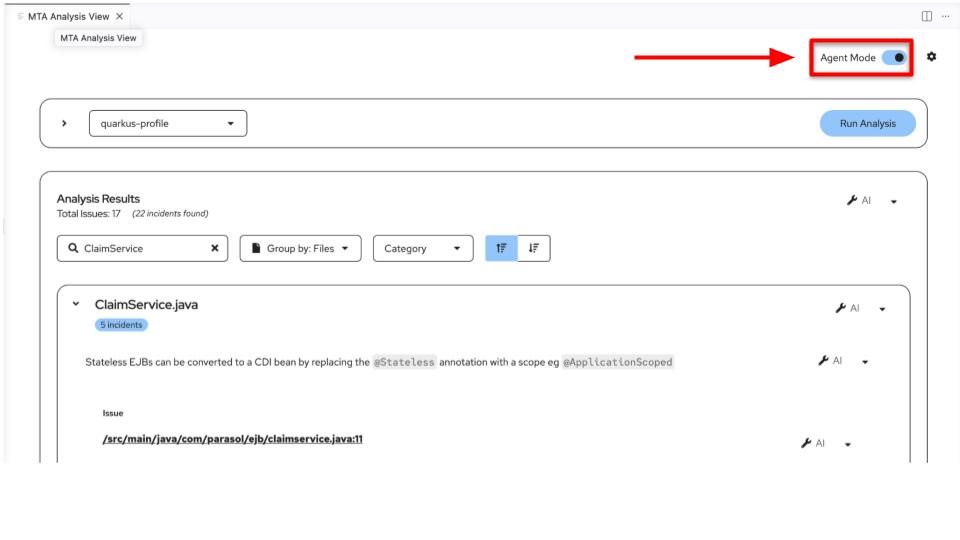 Figure 1. Agent Mode
Lets review the issues reported (wording may vary slightly by ruleset version):
-
@Statelessis not supported in Quarkus. Enterprise Java Beans (EJBs) are not supported in Quarkus. CDI must be used. Replace@Statelesswith a CDI scope annotation such as@ApplicationScoped. -
Container-managed transactions need an explicit replacement. Stateless session beans participate in container-managed transactions by default. On Quarkus, annotate the bean or business methods with
@Transactionalso claim queries still run in a transaction. -
javax.ejbimports are not supported. Removejavax.ejb.Statelessand usejakarta.enterprise.context.ApplicationScoped(andjakarta.transaction.Transactionalas needed). -
The package
javaxhas been replaced byjakarta. Update persistence imports (for examplejavax.persistence.→jakarta.persistence.) as the analyzer reports them.
Exercise 2: Generate and accept an AI solution
-
Now that we understand the Java EE to Quarkus migration for this local session bean, ask the LLM to generate curated fixes.
With results grouped by Files and filtered to
ClaimService, open the AI dropdown on the file and choose Get solution for N incidents (or Get solution).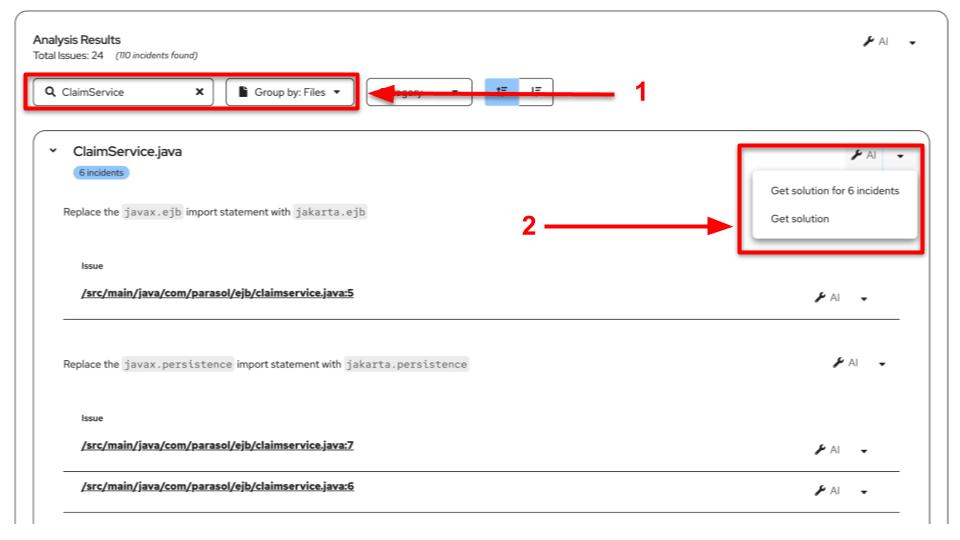 Figure 2. Get Solution
-
Results appear in the MTA Resolution Details tab. Review the generated patch — you should see
@Statelessreplaced with@ApplicationScoped, persistence wiring updated toward CDI (@Inject), and relatedjavax→jakartaimports. Use Review in Editor, Reject, or Accept. If the agent asks whether to continue fixing more changes, choose Yes or No as you prefer.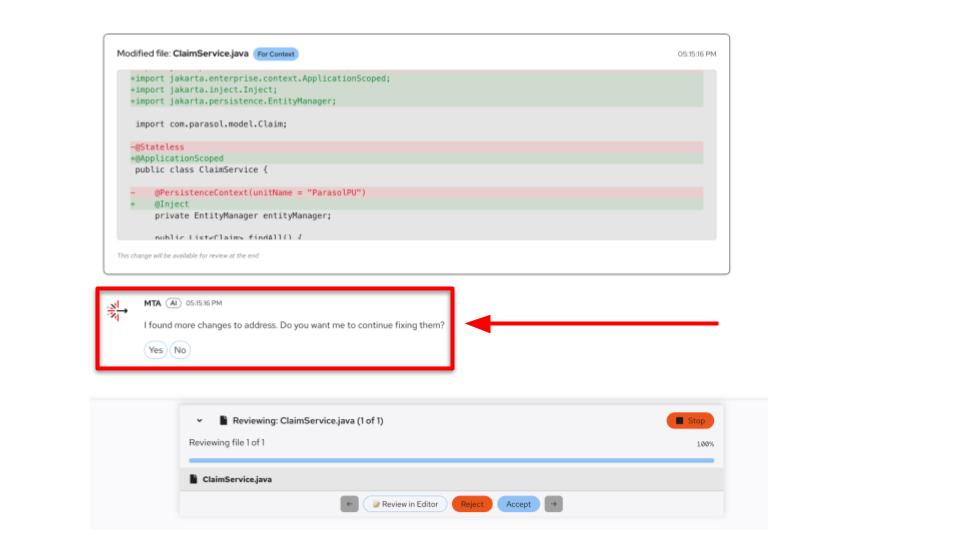 Figure 3. Accept and continue
Expect a shape similar to:
@ApplicationScoped
@Transactional
public class ClaimService {

    @Inject
    EntityManager entityManager;

    public List<Claim> findAll() { /* ... */ }

    public Claim findByClaimNumber(String claimNumber) { /* ... */ }
}
Exercise 3: Continue with agent-assisted fixes
-
With Agent Mode on, the agent may keep fixing follow-on issues (for example
pom.xmlQuarkus dependencies, persistence configuration, or other dependents). Review each suggestion and Accept, Reject, or Apply All / Stop as you see fit.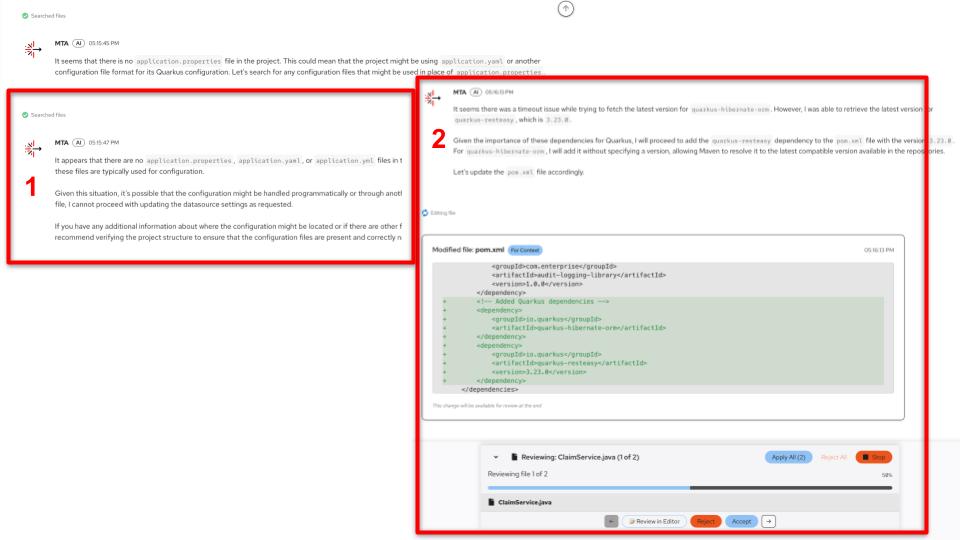 Figure 4. Agent follow-up
-
The agent loop looks like this: generate a fix, identify additional changes, let you accept or reject, then pull diagnostics from the IDE tools and optionally fix more issues.
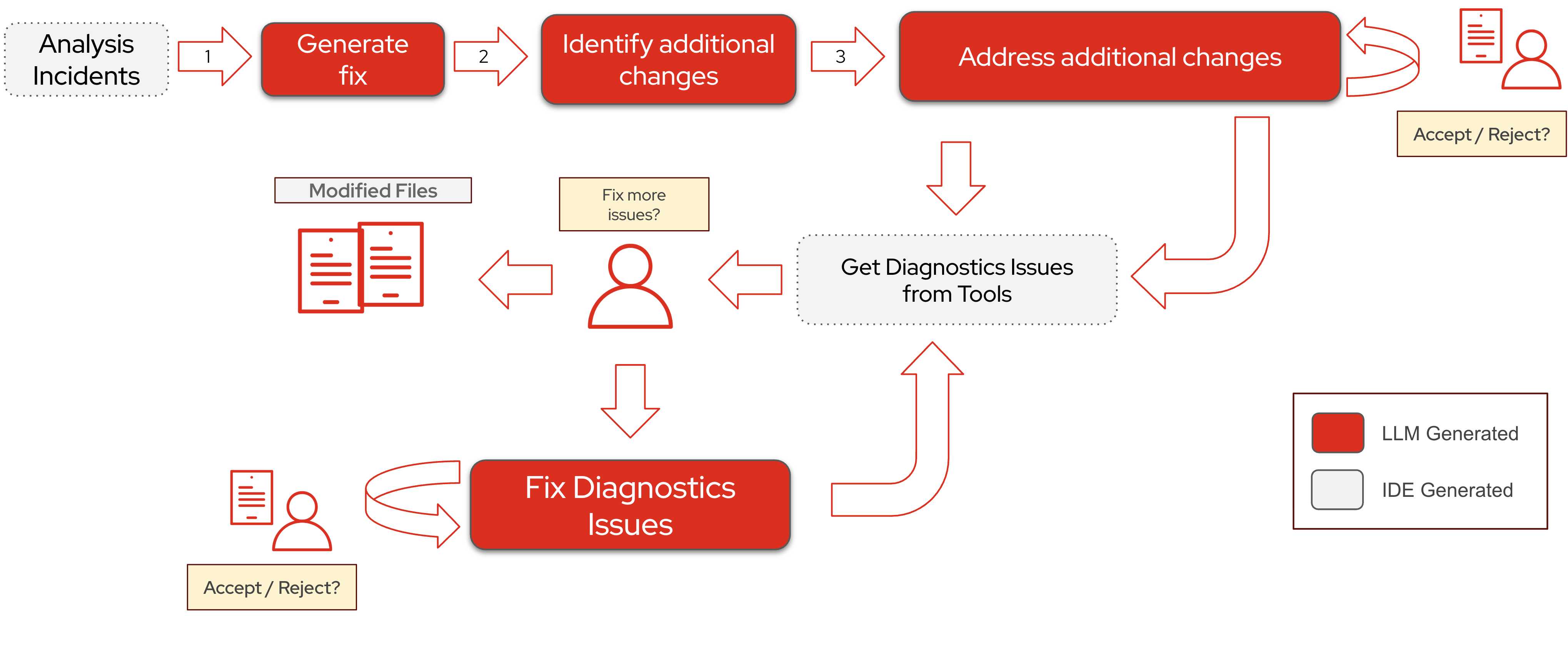 Figure 5. Agent workflow
Walk through the loop with
ClaimServiceas the concrete example:-
Generate fix (LLM) — From the analysis incident (for example “replace
@Statelesswith a CDI scope”), Developer Lightspeed proposes a first patch: annotations, imports, and the obvious call-site updates inClaimService.java. -
Identify additional changes (LLM) — One edit often implies others. After dropping
@Stateless, the agent may also rewrite@PersistenceContextto@Inject, updatejavax.→jakarta.imports, or touch callers such asClaimsResourcethat still expect EJB-style wiring. -
Accept / Reject (you) — You stay in control. Accept the patch if it looks right, reject it if the agent overreached, or review it in the editor before deciding. Nothing is applied permanently without your choice.
-
Get diagnostics from tools (IDE) — After a change lands, the agent asks the IDE for fresh signal: language-server errors, unresolved types, broken Maven coordinates, missing Quarkus extensions, and similar diagnostics. That is how it notices gaps the original MTA incident did not list.
-
Fix more issues? (you + LLM) — If diagnostics remain (for example no
quarkus-hibernate-ormdependency inpom.xml, or noapplication.propertiesfor datasource settings), the agent asks whether to continue. Choose Yes to let it generate the next patch; choose No / Stop to end the loop. -
Repeat — Each accepted fix can surface new diagnostics, so the cycle continues until the workspace is clean enough for you — or until you stop it.
In short: MTA finds the migration problem → the LLM proposes a fix → you approve → IDE diagnostics reveal the next problem → optionally fix again. That is why Agent Mode is powerful for ripple effects after an EJB → CDI change, and why you should still read every diff.
-
Agents will look to fix potential issues once a fix was made.
For example, after moving EmailIntakeMDB to Reactive Messaging or ClaimService to CDI, the agent may still need to adjust pom.xml, persistence configuration, or other dependents. The agent understands the context and the issues that arise from that fix. It uses tooling like the LSP server, build tools, compilation etc.
The agent will also keep on fixing issues as it finds them, at each step it will ask if the user would like to fix potential issues found in the process. The user can quit at any stage.
|
Please try out some of the fixes from the agents, and feel free to press No if you don’t want to continue with the agent changes. You can also accept or reject fixes suggested by the agent as you see fit. |