Section 5: Custom rules for the audit logging library
Goal
Learn why custom MTA rules matter for proprietary libraries:
-
Explore the audit-logging rules shipped with
parasol-insurance-eap -
Attach them to an MTA analysis profile
-
Run analysis so you can see findings that stock Quarkus rules cannot detect
Stock migration rulesets (for example the Quarkus target rules) know about Java EE, Jakarta, and common open-source frameworks. They do not know about Parasol’s internal audit-logging-library. Without custom rules, MTA would happily migrate EJBs and MDBs while silently leaving a broken, outdated audit API in place — a compliance risk for an insurance platform.
In this section you will treat custom rules as first-class migration knowledge: authored once by platform / architecture teams, then reused every time an application depends on that library.
Why Parasol needs custom rules
Parasol Insurance depends on a shared enterprise library, com.enterprise:audit-logging-library, vendored under the project as a local Maven repository:
-
v1 (
1.0.0) — synchronous, filesystem-oriented audit logging (builder-basedAuditEvent,FileSystemAuditLogger, convenience methods such aslogSuccess/logFailure) -
v2 (
2.0.0) — streaming-oriented API (StreamableAuditLogger, record-styleAuditEvent, non-blockinglogEventAsync)
The JARs and POMs live under lib/repository/. The application currently declares v1 in pom.xml via the project-local file repository — exactly the kind of private dependency that never appears on Maven Central and never ships in public Quarkus rules.
| v1 (what you have today) | v2 (migration target) |
|---|---|
Synchronous file-based logging |
Asynchronous / streaming logging |
|
Direct |
|
|
|
Prefer |
Exercise 1: Explore the custom rules
Open logging.yaml to download the file to your local drive.
Skim each ruleID, when: clause, and message: in logging.yaml — these are what the analyzer will report in the Analysis panel. The file defines five rules (audit-logging-0001 … audit-logging-0005).
What each rule detects
| Rule ID | Detects | Typical migration action |
|---|---|---|
|
Maven dependency on |
Bump to |
|
Calls to |
Replace the builder with direct |
|
References to |
Switch to |
|
Synchronous |
Prefer non-blocking |
|
Legacy |
Build a full |
Custom rules use the same MTA rule language as public rulesets (java.dependency, java.referenced, categories, effort, labels). The difference is ownership: these rules encode Parasol’s private library contract.
|
Also open pom.xml and find the dependency on audit-logging-library version 1.0.0, and the project-local repository pointing at lib/repository. This is the concrete hook for rule audit-logging-0001.
Exercise 2: Attach the custom rules to an MTA profile
Earlier you configured the MTA extension and you might have noticed that there is also an option to add custom rules in our analysis. Let’s get started with adding custom rules to our quarkus-profile.
-
Open the MTA Analysis View. Click the gear icon (1), then under Select Profile click Edit in Profile Manager (2).
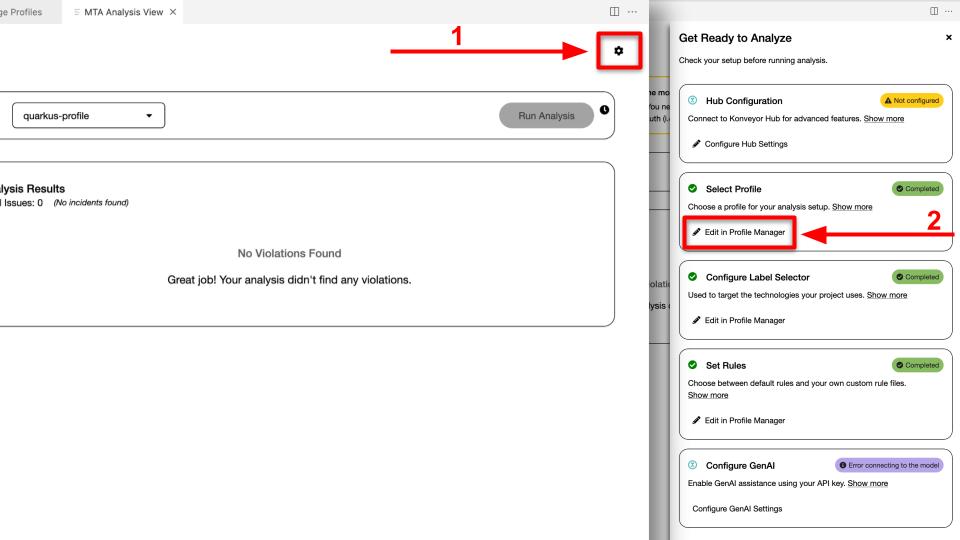 Figure 1. Edit in Profile Manager
-
Let’s attach custom rules to our
quarkus-profile. -
In Profile Settings, set the migration target consistent with this workshop (Quarkus / the same target family used by
quarkus-profile). Custom rules in this repo are labeled toward a Quarkus 3-style target. -
Under Custom Rules, click Upload Custom Rules… and upload the
logging.yamlfile you downloaded earlier.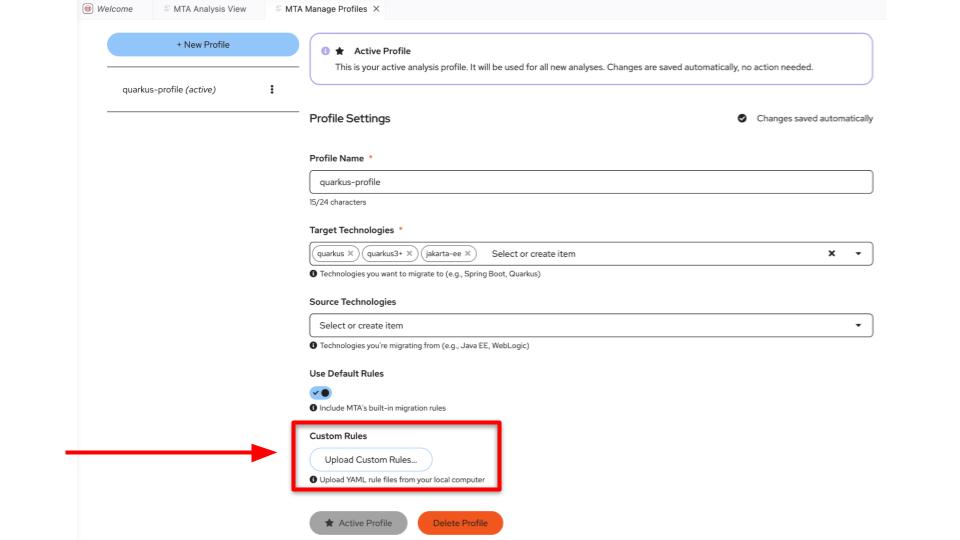 Figure 2. Custom Rules
-
Since we only have one profile
quarkus-profile, it should already be (active).
If you only run quarkus-profile without the custom rules path or upload, you will still see Java EE → Quarkus findings (MDB, EJB, and so on), but you will miss the audit library incidents. Custom rules and stock rules complement each other.
|
Exercise 3: Run analysis and inspect custom findings
-
Congratulations on completing exercise 3! now it’s time to run analysis. Since we are using the same active profile as before
quarkus-profile. head to the analysis panel again and run the analysis. The server would have already stopped. This is by design — when you change a profile, the server stops so it can pick up the changes on restart. PressStartbutton to start the server and then run theAnalysisagain. -
When the Analysis panel populates, filter or search for findings related to audit /
Audit. Expand incidents and confirm you can map them back to the rule IDs you read inlogging.yaml. At minimum you should see a dependency finding foraudit-logging-library1.0.0 inpom.xml(ruleaudit-logging-0001). -
For a finding such as replacing
FileSystemAuditLogger, open the AI dropdown and choose Get solution (or Get solution for N incidents).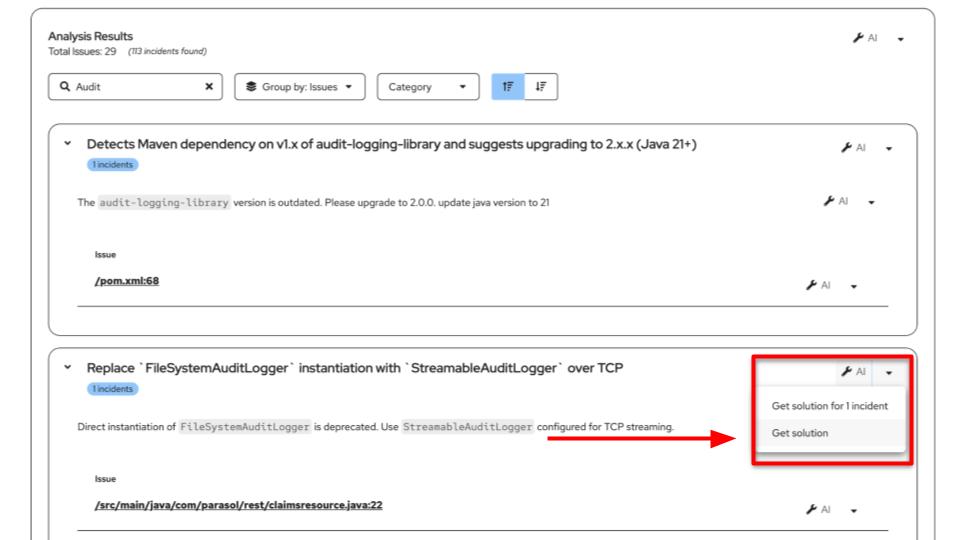 Figure 3. Get Solution
-
Review the generated patch in MTA Resolution Details. Confirm the change (for example
FileSystemAuditLogger→StreamableAuditLogger), then choose Review in Editor, Reject, or Accept.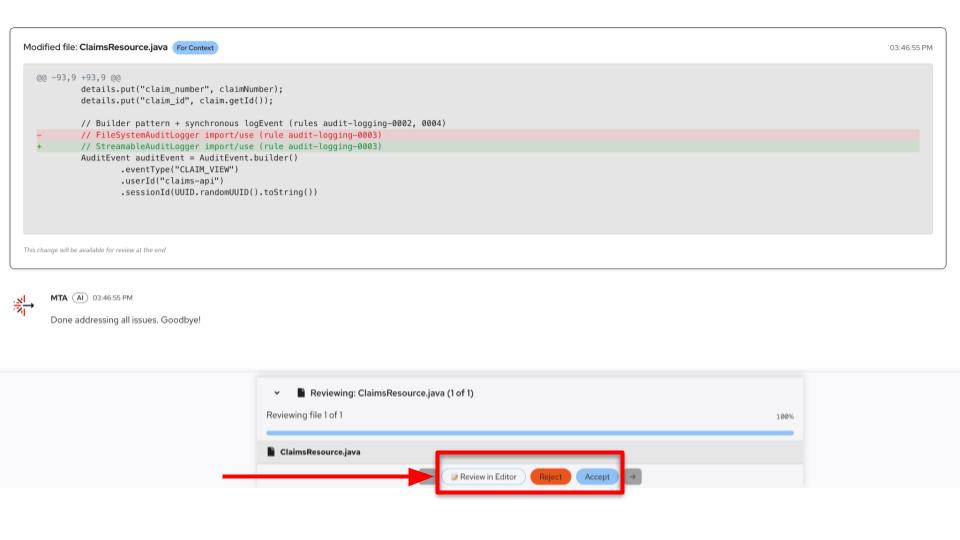 Figure 4. Accept patch
-
Next, search the Analysis panel for
ClaimsResourceand set Group by: Files. Open the AI menu and request a solution for the incidents on that file (rulesaudit-logging-0002…0005fire on call sites such asAuditEvent.builder,logEvent, andlogSuccess/logFailure).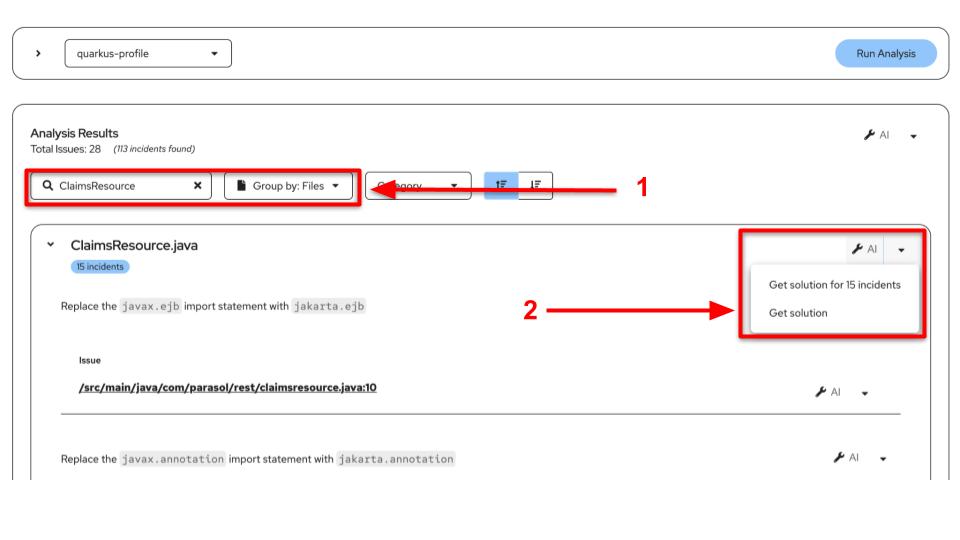 Figure 5. ClaimsResource AI
-
Review the additional patches. For example, legacy
logSuccess(…)should become construction of a fullAuditEvent(and typicallylogEventAsync). Accept or reject after you understand the diff.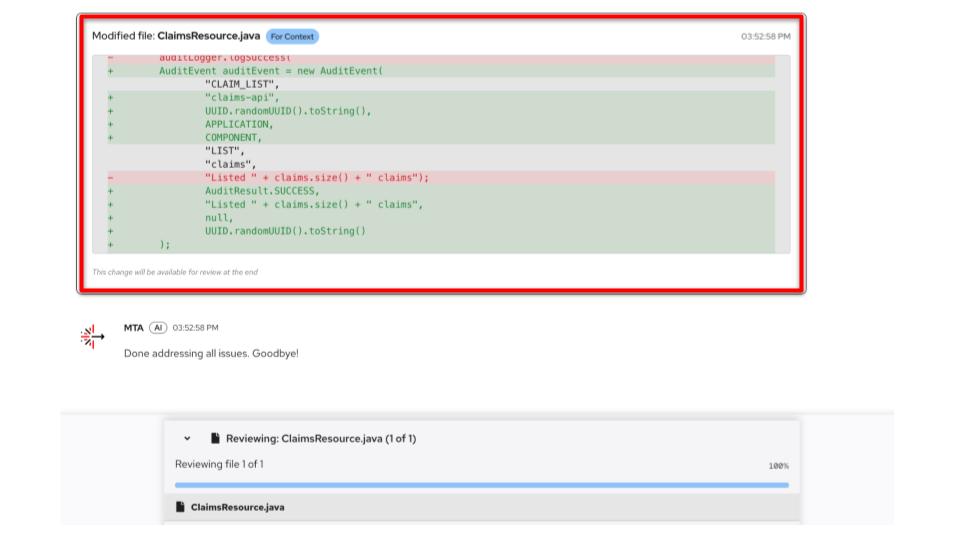 Figure 6. AuditEvent patch
Read each finding message carefully. Notice how the rule text is written for humans and for Developer Lightspeed: clear intent (“upgrade to 2.0.0”, “use logEventAsync”, and so on) without requiring the model to invent Parasol policy from scratch. Custom-library upgrades can imply Java level and API changes beyond a single version number — review diffs before accepting.
|
What we learned
-
Gap in stock rules: Public Quarkus / Java EE rulesets do not understand proprietary libraries such as
audit-logging-library. -
Custom rules structure: Rule files such as
logging.yamlusewhen:conditions and actionablemessage:text that MTA (and Developer Lightspeed) can act on. -
Five migration areas: dependency bump, event construction, logger implementation, sync → async logging, and removal of convenience methods.
-
Profile wiring: MTA analysis only applies custom rules when the active profile points at the
rules/path. -
Portfolio reuse: The same
rules/folder can be shared across every Parasol service that depends on the audit library — write once, analyze many times.
Verify
-
The
rules/directory exists inparasol-insurance-eapand containslogging.yaml(copied or downloaded from this guide if needed). -
You can explain in your own words what at least three of the five
audit-logging-**rules detect. -
An MTA profile is configured with the custom
rules/path and has been used to run analysis. -
You can identify the
audit-logging-0001finding against the v1 dependency inpom.xml.