Token Rate Limiting
With authentication in place, the next layer of control is token consumption. A TokenRateLimitPolicy tracks the actual tokens used in LLM responses, rather than simply counting requests like traditional rate limiting.
flowchart LR
    AGT5 <--> AI5
    AI5 <--> GW

    GW --- GWp
    GWp[" "] --> |"🥇 Rate Limit"| GP
    GWp --> |"🥈 Rate Limit"| SP

    AGT5@{ img: "../../_images/module-03/common/agent-icon.svg", label: "Support Agent", pos: "b", h: 80, w: 80, constraint: "on" }
    AI5@{ img: "../../_images/module-03/common/ai-icon.svg", label: "AI Assistant", pos: "b", h: 80, w: 80, constraint: "on" }
    GP@{ img: "../../_images/module-03/common/profile-icon.svg", label: "Gold Profile", pos: "b", h: 80, w: 70, constraint: "on" }
    SP@{ img: "../../_images/module-03/common/profile-silver-icon.svg", label: "Silver Profile", pos: "b", h: 80, w: 70, constraint: "on" }

    style AGT5 fill:none,stroke:none
    style AI5 fill:none,stroke:none
    GW@{ img: "../../_images/module-03/common/guardrail-icon.svg", label: "Connectivity Link", pos: "b", h: 80, w: 80, constraint: "on" }

    style GW fill:none,stroke:none
    style GWp fill:none,stroke:none,width:1px,height:1px
    style GP fill:none,stroke:none
    style SP fill:none,stroke:none
Rate limiting policies are a powerful way to combine AI capabilities with cost and resource control. In this exercise, you’ll see how the Customer Profile Tool uses token budgets to decide which tier of analysis to produce.
Every LLM request consumes compute power, and richer analysis consumes more of it. As AI adoption grows, managing cost and infrastructure capacity becomes critical. Rate limiting policies help organisations control token usage across their services.
In this exercise, the Customer Profile Tool goes beyond simple rate limiting with a graceful degradation strategy. It first attempts a Gold analysis, and when the Gold budget is consumed, falls back to Silver to keep producing useful profiles at a lower cost. Only when both are exhausted is the request rejected:
See how the fallback is implemented in CamelThe route below shows the Gold path definition in Camel. Inside a Circuit Breaker block, it obtains data for the LLM to process. If Connectivity Link rate-limits the call, it responds with an error, Camel marks the path as failed, and the route falls back to the Silver path. 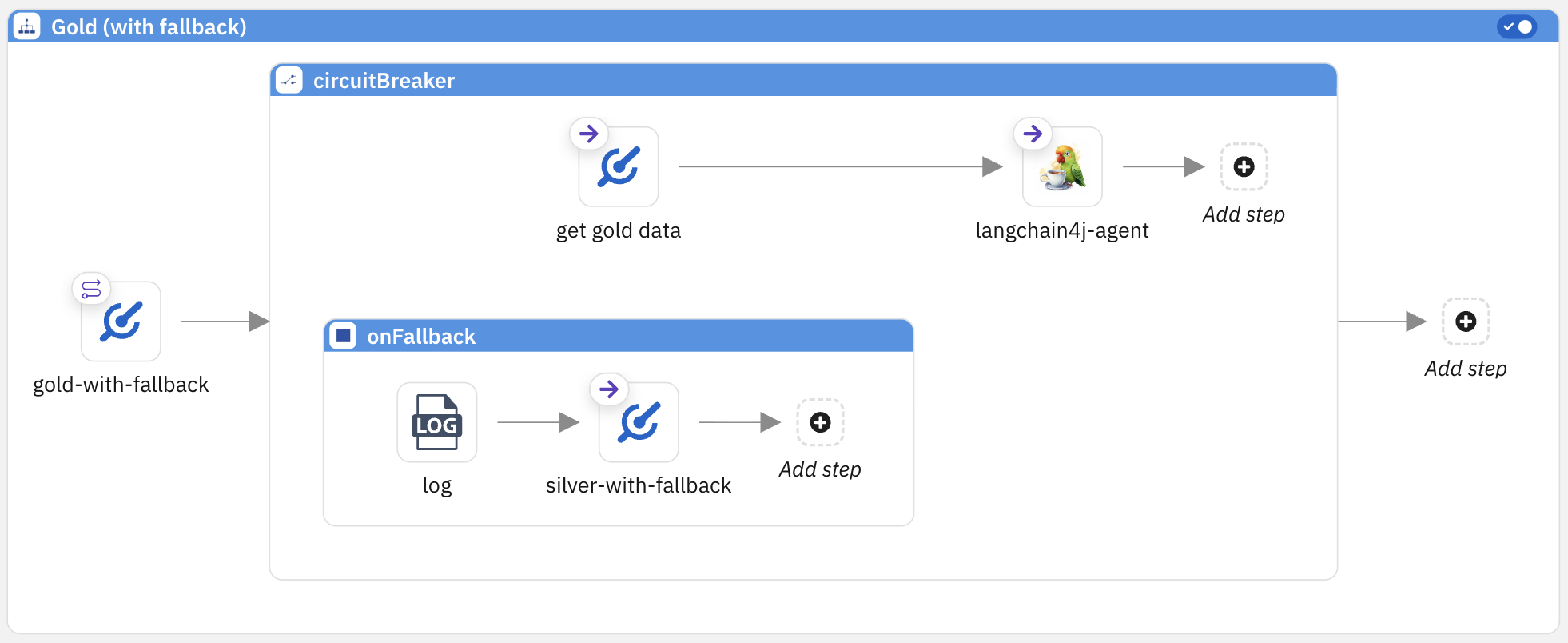
|
The diagram below illustrates the flow of the fallback strategy:
flowchart TD
    REQ(["Profile Request"]) --> QA["🥇 Gold quota available?"]
    QA -->|"✅ yes"| GOLDBox
    QA2 -->|"✅ yes"| SILVERBox
    QA --> |"❌ no"| QA2["🥈 Silver quota available?"]
    QA2 -->|"❌ no"| ERR["⚠️ Try again later"]

    subgraph fallback [" "]
        direction TD
        SILVERBox
        ERR
    end

    GOLDBox["<div style='display:flex;align-items:center;gap:20px;min-width:280px'><img src='../../_images/module-03/common/profile-icon.svg' style='width:60px;min-width:60px;max-width:60px'/><div style='text-align:left'><b style='font-size:1.3em'>Gold Analysis</b><br/>• Full purchase history<br/>• Spending patterns<br/>• Loyalty status</div></div>"]

    SILVERBox["<div style='display:flex;align-items:center;gap:20px;min-width:230px'><img src='../../_images/module-03/common/profile-silver-icon.svg' style='width:60px;min-width:60px;max-width:60px'/><div style='text-align:left'><b style='font-size:1.3em'>Silver Analysis</b><br/>• Recent orders<br/>• Basic profile</div></div>"]

    style REQ fill:#f5f5f5,stroke:#EE0000,color:#333
    style QA fill:none,stroke:none,color:#333
    style QA2 fill:none,stroke:none,color:#333
    style GOLDBox fill:#e8f5e9,stroke:#66bb6a,color:#333
    style SILVERBox fill:#e8f5e9,stroke:#66bb6a,color:#333
    style ERR fill:#fce4e4,stroke:#EE0000,color:#333
    style fallback fill:none,stroke:none
To put this into practice, you will apply a TokenRateLimitPolicy that assigns each tier its own token budget. Then you’ll test the fallback behaviour by sending profile requests until the Gold budget is consumed, and observe the system switch to Silver.
Start the Agentic Integration
Ensure the agent is running in your terminal. If you stopped it after the previous exercise, start it again:
What does this command do?
|
Apply and Verify the TokenRateLimitPolicy
The TokenRateLimitPolicy is a gateway-level resource. It defines token budgets per tier and lets the gateway enforce them independently of the running application.
-
Open a new terminal tab in DevSpaces by clicking the + icon (keep the previous tab with Camel running so you can test later).

Because the policy operates at the infrastructure level, you can apply it while the agent is running, with no restart required. -
Examine the token budgets for each tier, then apply the policy to your namespace:
The policy defines two token budgets that reflect the cost of each tier:
-
Gold — richer analysis, higher compute cost. A stricter token allowance with a slower renewal window.
-
Silver — lighter analysis, lower compute cost. A more generous token allowance that renews faster.
Review the TokenRateLimitPolicy below and apply it by pasting the following yaml in your new terminal tab:
Notice how the YAML matches the tier budgets described above:
goldwith a tighter limit and longer window,silverwith a more generous allowance that renews faster.The TokenRateLimitPolicy depends on the AuthPolicy. The
auth.identity.groupsandauth.identity.useridfields referenced here are populated by the AuthPolicy’sresponse.success.filterssection. Without the AuthPolicy, the TokenRateLimitPolicy would have no identity context to evaluate. -
-
Verify the TokenRateLimitPolicy
From the devspaces terminal, run the following command to check that the TokenRateLimitPolicy was created successfully:
What does this command do?
-
oc describe tokenratelimitpolicy— shows the full details of the TokenRateLimitPolicy resource -
-n username-devspaces— targets your namespace -
grep -iE "Name:|target|…"— filters the output to show only the key fields (name, targets, limits, and status)
You should see output confirming the TokenRateLimitPolicy exists, is targeting the correct HTTPRoute, and is in an enforced state, similar to:
Name:         openai-token-limits
    Gold:
        Limit:   50
        Window:  4m
    Silver:
        Limit:   500
        Window:  2m
  Target Ref:
    Name:   ai-proxy-route
Status:
    Status:                True
    Type:                  Accepted
    Status:                True
    Type:                  Enforced
With the policy showing Enforced, the gateway is now actively tracking token usage for both tiers.
Time to see the fallback strategy in action. -
Test Token Rate Limiting from Rocket.Chat
-
Go back to Rocket.Chat and issue the same request as in the previous exercise:
The order number in this request is illustrative — the Customer Profile Tool uses simulated input data from JSON files in the data/folder of your project. You can explore these files in the source code to see the mock CRM, history, audit, and ticket data that feeds the analysis.Since the Gold token budget is still fresh, the system should produce a GOLD TIER ANALYSIS, just like in the previous exercise.
-
Test again to see the system switch to Silver.
The previous request should have consumed the Gold token budget (approximately 50 tokens). Try asking again to see the system switch to Silver, a simple "try again" prompt should do the trick.
You should now see a SILVER TIER ANALYSIS instead of Gold. The response is shorter, with only two sections (Customer Profile and Open Issues), reflecting the lighter analysis tier:
rocket.chatAai-bot 11:21 AM
🥈 SILVER TIER ANALYSIS
📊 Customer Profile- Alex Morgan, Gold membership, US-South region
📋 Open Issues- TKT-0871 — Welcome documents not received — Policy 58201437 (resolved)
- TKT-0943 — Billing discrepancy — December statement (resolved)
- TKT-1025 — Roadside Assistance removed (Policy 61356291) — open
This confirms the fallback strategy in action: the Gold budget was consumed by the first request, so the system automatically switched to Silver.
-
Keep sending profile requests. The Silver budget is more generous, so you should receive several Silver analyses before the budget is exhausted. Keep asking until the system can no longer produce a profile:
-
Once both budgets are consumed, the system has no remaining capacity. You should see a SERVICE NOTICE with a
429 Too Many Requestsstatus, confirming that the token rate limiting policy is fully enforced:rocket.chatUusername 11:25 AMPlease try againAai-bot 11:25 AM
⚠️ SERVICE NOTICE
📡 System Insight- Status: 429 Too Many Requests
- Action: Intelligence Service is currently paused due to high traffic.
- Notice: Please try your request again in a few moments.
| Token budgets are not permanent. They operate on a time window basis, so after enough time passes the budgets get replenished. If you wait a few minutes and try again, the system will resume producing profiles following the same fallback strategy: Gold first, then Silver. |